Arena
Combat rules
Tactical combat reference with illustrated LOS paths, hexside choices, worked elevation examples, woods, smoke and cover rules, vehicles, quad mechs and battlefield effects.
Reviewed
The Ignis SRM tank silhouette correction awaits the updated client. The brighter map facing marker awaits the updated client. Combat-log terrain-chatter removal requires the updated client and Battle Server. Rules follow the reviewed local implementation; compatible client/Battle Server deployment and wiki publication remain pending. Push, woods TF destruction, Calm fire/smoke and two-level automatic charge/push falls are implemented locally. Existing building rules stay unchanged. Roads, snow, undefined terrain, absent weapons and additional wind types remain outside this release. Streak terrain attacks use ordinary same-size SRM rules. Splash at map boundaries and ammunition consumption through resolution include the approved local correction, pending the compatible game update. The vehicle incoming-hit correction uses 60-degree front/rear and 120-degree side sectors and also awaits the next game update. Attacker arc/range overlays and shared turret/quad-leg arc corrections await compatible client/Battle Server deployment.
This reference covers Neveron's tactical combat: turn order, movement, sight, weapon attacks, damage, physical attacks, heat, crews, infantry, buildings and leaving a battle. Open Arenas to enter a match, and use the Tutorial Hub's Vehicle Combat Tutorial or Mech Combat Tutorial to practise the controls. See Arenas and tactical combat for entry, terrain selection and results.
Availability: current-rule sections describe the reviewed local combat implementation. Recent corrections may require the next compatible game update; this reference does not confirm production deployment. Unit equipment, match settings and the server's accepted action preview determine what your unit can do. Push, Clear Woods, Ignite Terrain and Calm fire/smoke are implemented locally and require the compatible game update before use. Other winds and equipment not currently offered by the game remain planned reference.
A combat round
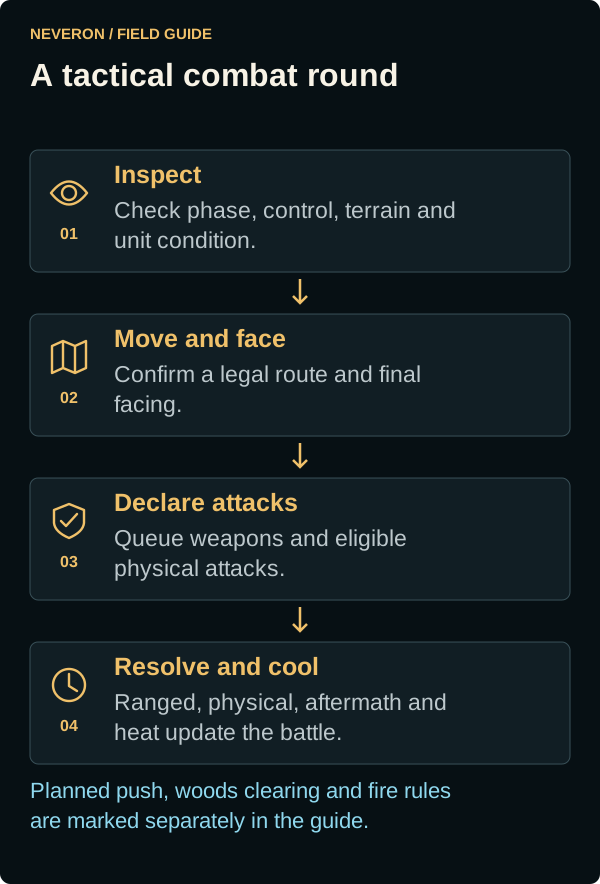
- Check the phase and control. You can order only units assigned to you. Take control claims an eligible AI unit; Human hands your unit to AI where permitted. Manual control is limited to 12 units. Orders for another human controller's unit are rejected.
- Move. Plot a legal path, choose movement options and final facing, then confirm. Terrain, elevation, occupancy, damage and heat affect your available movement.
- Declare attacks. Select targets and weapons, then use Fire. Punch, Kick, Hatchet and Push use separate declarations. Inspect a woods hex for Clear Woods and Ignite Terrain. In private and betting matches, finish both ranged and physical decisions before marking the Fire phase complete.
- Resolve. Accepted ranged declarations resolve before physical attacks. The physical exchange is followed by charge displacement and other aftermath. Heat, required balance checks and casualty handling update the next round.
Private and betting matches roll initiative per side, rather than per surviving unit. The battle feed reports the winner and probability, including the configured catch-up adjustment for the side behind in initiative wins. Public arena timing follows its own phase schedule; watch the displayed phase and deadline.
Attacks within the same ranged exchange use the eligible declarations captured for that exchange: destroying a shooter early does not erase its already accepted volley. Physical attacks have their own snapshot after ranged aftermath. Charge movement happens after the physical exchange, so it cannot move a target early to cancel that target's declared physical attack.
Both players should see the same active phase. The client phase-ordering correction prevents an older movement update from overwriting Fire during entry or reconnect; it requires the updated client. If phases disagree, refresh and check the phase and battle log before issuing another order.
An unacknowledged order is not a confirmed action. Check the battle log after rejection, timeout or reconnect. Returning from a sleeping computer does not grant extra phase time.
Already declared applies to the current round: that weapon is committed and cannot be retargeted during the same Fire phase. A new round clears those declarations and physical-attack reservations; weapons remain subject to ammunition, damage, range and arc limits. The round-reset display correction requires the updated client.
Dice, skills and attack chances
Most attack and Piloting checks roll two six-sided dice, add them and compare the result with a target number. Meeting or exceeding the target succeeds. Lower Gunnery and Piloting ratings are better because they lower the target number. Damage, movement, terrain and equipment can add modifiers.
| Target number | Chance on 2D6 | Target number | Chance on 2D6 |
|---|---|---|---|
| 2 or less | 100% | 8 | 41.7% |
| 3 | 97.2% | 9 | 27.8% |
| 4 | 91.7% | 10 | 16.7% |
| 5 | 83.3% | 11 | 8.3% |
| 6 | 72.2% | 12 | 2.8% |
| 7 | 58.3% | 13 or more | 0% |
These are the probabilities of an ordinary 2D6 check. Some events use one die, cluster tables or automatic results. An impossible weapon shot is canceled after final modifiers are known, without ammunition use, weapon heat or an attack roll. A stand-up attempt with a target above 12 can still consume the attempt and fail.
Movement, terrain and facing
With the facing-marker update, a bright gold arrow with a dark edge shows a unit's facing and the final facing of a plotted move. Check the arrow before confirming movement, especially in woods. Unit colours still identify the unit; infantry and unknown sensor contacts do not show a facing arrow. This visibility update requires the updated client.
The map's elevation colours progress from green at levels 0–4 to brown at levels 5–11, then off-white at levels 12 and above. High land hexes use dark elevation numbers for readability. Water keeps its blue colour, and woods, rough ground and buildings remain visible over the elevation colour. The off-white high-elevation display requires the compatible client update.
Tap or click a destination to plot movement. Press and hold the destination, then drag around it to set facing before confirming. Long press a hex to inspect terrain, elevation and building state. On touch screens, an immediate drag pans the battlefield. Right click clears a plotted route.
Movement points pay for the route, turns and applicable elevation/terrain costs; counting hexes alone is insufficient. The movement readout already includes current damage and heat penalties. Backup lets a unit reverse while preserving its facing. Jump appears only for jump-capable units and uses jump capacity plus a legal landing location. A mech that spent movement standing cannot then jump that turn.
| Unit or terrain | Practical restriction |
|---|---|
| Wheeled vehicles | Cannot enter woods, rough or rubble. Use legal open ground and road routes; depth-one and deeper water block their normal ground paths. |
| Tracked vehicles | Can cross light woods, rough and rubble; heavy woods and depth-one/deeper water block their normal paths. |
| Hover vehicles | Can cross water, rough and rubble, but cannot enter woods. |
| Mechs | Use legal ground or jump routes. Water, damaged legs/gyro and difficult transitions can introduce balance checks and weapon restrictions. |
| Infantry | Foot, motorized, mechanized and jump movement have different terrain rules. A transport cannot unload a squad into terrain its mode prohibits. |
| Buildings | Ground entry uses interior occupancy; jumping onto a building uses rooftop occupancy, which is restricted to mechs. Structure support and entry checks still apply. |
Walking, running and jumping also affect firing accuracy. For mechs the ordinary attacker penalties are +1 walking, +2 running and +3 jumping, before other conditions. Stationary fire avoids that movement penalty. The movement modifier against a target follows its recorded movement, rather than the attacker's distance to it:
| Recorded movement hexes | Target movement modifier |
|---|---|
| 0–2 | +0 |
| 3–4 | +1 |
| 5–6 | +2 |
| 7–9 | +3 |
| 10–17 | +4 |
| 18–24 | +5 |
| 25 or more | +6 |
Additional posture, jump and unit-specific modifiers can change the final preview. Turning in place is not a substitute for moving across the battlefield. A path ending in an occupied enemy hex needs a legal Charge or DFA; ordinary movement cannot use that exception.
Visibility, woods and partial cover
Visual line of sight, electronic detection and permission to attack are separate. A sensor-only contact appears as an unknown contact; it is not automatically a firing solution. Fog of war depends on the match's visibility settings. Read Sensors and jammers for detection ranges, signatures and friendly jammer coverage.
Line of sight (LOS) runs between the centres of the two units' hexes. Check the crossed hexes using the elevation and adjacency rules below. A drawn rising arrow illustrates the result; it does not mean every obstacle is tested against a continuously sloping ray. If the line lies exactly along a hexside, the defender gets the less favourable LOS or terrain result for the attacker. A crossed hex at a grazing vertex still counts.
LOS height and intervening terrain
For ordinary land hexes, add the unit's height to its ground elevation:
| Unit or terrain | Height used for LOS |
|---|---|
| Standing BattleMech, including a standing quad | Ground elevation +2 |
| Prone BattleMech | Ground elevation +1 |
| Ground vehicle or conventional infantry | Ground elevation +1 |
| Light or heavy woods | Ground elevation +2 to the treetops |
| Hill or other ground | The hex's ground elevation |
| Intact building | Its roof elevation |
A crossed hex between the units qualifies as intervening terrain when any one of these conditions applies to the relevant ground, roof or treetop height:
- It reaches or exceeds both units' LOS heights.
- It is adjacent to the attacker and reaches or exceeds the attacker's LOS height.
- It is adjacent to the target and reaches or exceeds the target's LOS height.
Qualifying ground or an intact building roof blocks direct LOS. Qualifying woods add woods points instead. Equality counts: adjacent ground at the lower unit's LOS height can block even though it is below the higher unit's LOS height. A distant obstacle below the higher unit's LOS height can be ignored when neither adjacency condition applies. Rooftop occupancy and water have additional rules; the examples below assume ordinary land hexes.
Mech and tank heights
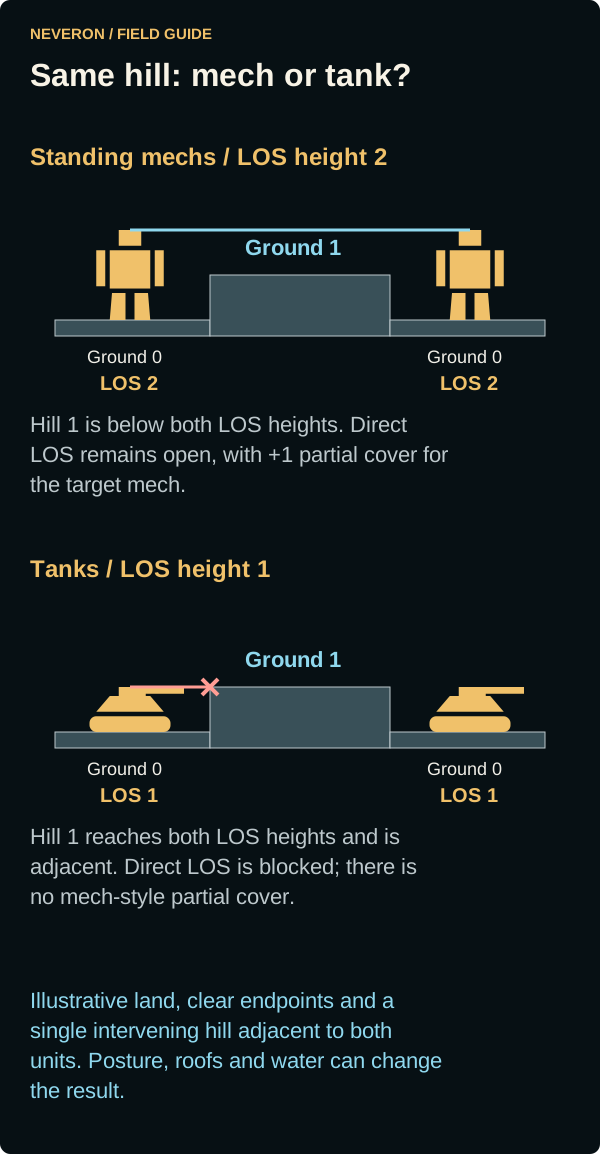
A standing mech adds 2 levels to its ground elevation; a tank adds 1. On ground level 0, their LOS heights are therefore 2 and 1. The comparison below keeps the terrain identical: one level-1 hill between the units, adjacent to both. The standing mechs can see over it, but the target mech has +1 partial cover. For tanks, that same hill reaches LOS height and blocks the shot. In a mixed mech-versus-tank pair, it also blocks because it is adjacent to the tank and reaches the tank's height, regardless of which unit fires.
Which crossed hexes count?
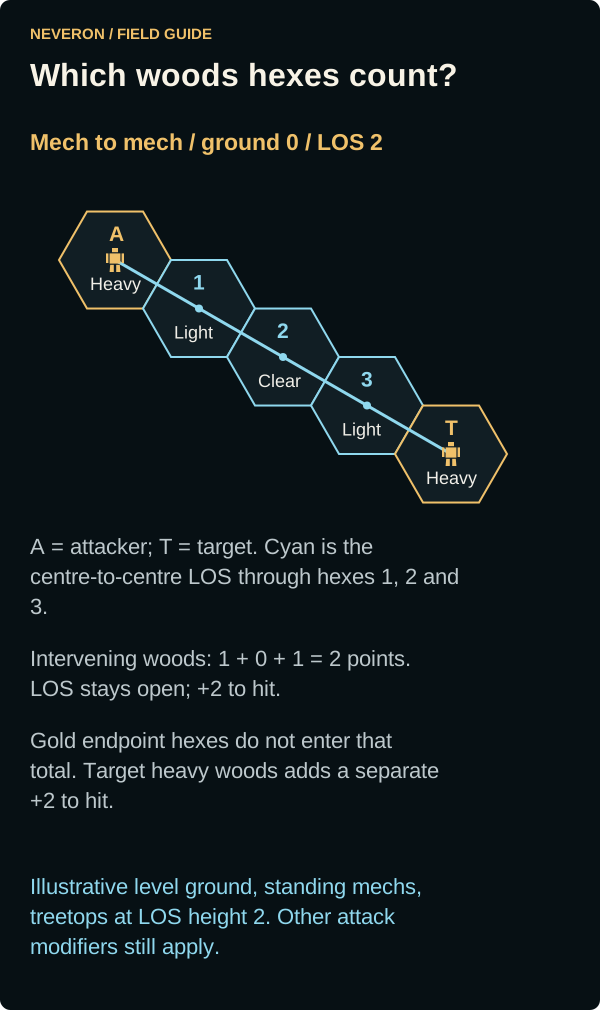
Follow the centre-to-centre line through the crossed hexes between attacker and target. In this level-ground example, both standing mechs have LOS height 2 and all treetops reach 2. The two crossed light woods hexes contribute 1 point each; the clear hex contributes 0. The intervening total is 2, so direct LOS remains open with +2 to hit. Heavy woods in the attacker's and target's own hexes are excluded from that blocking total. The target's heavy woods adds a separate +2 to hit, making the woods modifiers +4 for this shot before other modifiers.
Tanks: both tanks have LOS height 1 on ground level 0. The treetops still reach both units' heights, so the same two light woods hexes contribute 2 points and +2 to hit. Target heavy woods still adds its separate +2. A mixed standing-mech/tank pair on this level ground has the same woods result.
LOS along a hexside
When the centre-to-centre line follows a shared hexside exactly, the bordering hexes form alternative paths. The defender gets the result less favourable to the attacker. Here the upper path crosses light woods for +1, while the lower path crosses heavy woods for +2. Both paths remain open, so use +2. Do not add the two alternatives together as 3 points. If one candidate path blocks LOS, the defender gets blocked LOS. A line that only touches a vertex does not create this choice; that touched hex still counts.
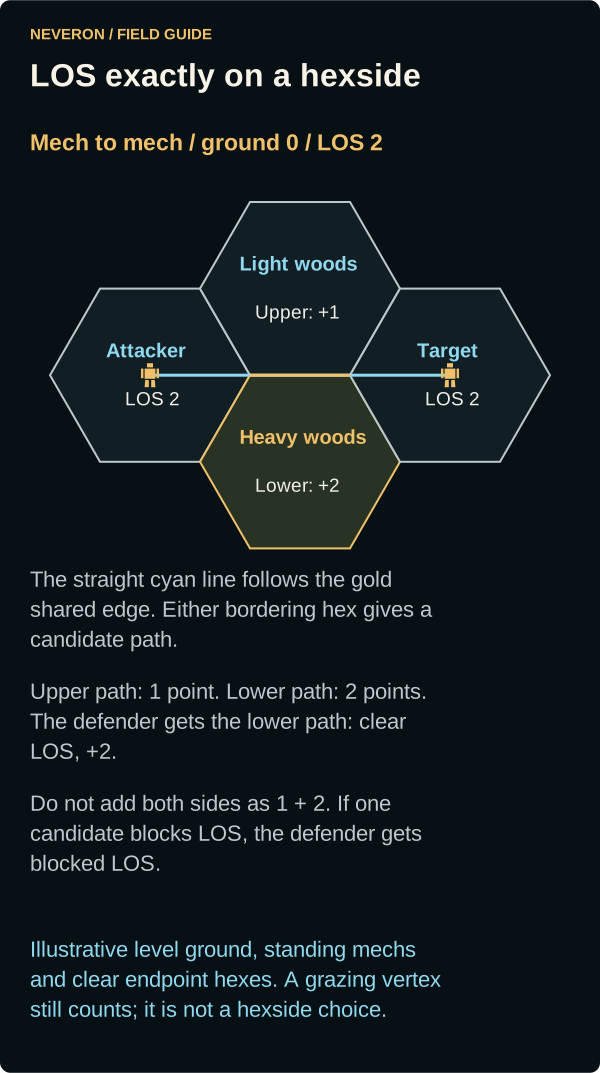
Tanks: LOS height is 1, but both woods alternatives still qualify. The defender again chooses the heavy-woods path for +2. The same choice applies to a standing-mech/tank pair on this level ground.
Heavy woods and elevation
Count only woods that qualify under the height and adjacency rules. Light woods contribute 1 point and +1 to hit; heavy woods contribute 2 points and +2 to hit. A total of 3 or more intervening woods points blocks direct LOS. One heavy woods hex leaves LOS open at +2; two heavy woods hexes block it. One light plus one heavy also blocks it. The attacker's and target's own hexes are excluded from this intervening total; woods in the target's hex can still add their separate target-terrain modifier.
The side views compare standing mechs (+2 unit height) and ground vehicles (+1) on identical terrain. Woods always rise 2 levels above their own ground. The unit heights differ, but the three illustrated woods outcomes are the same.
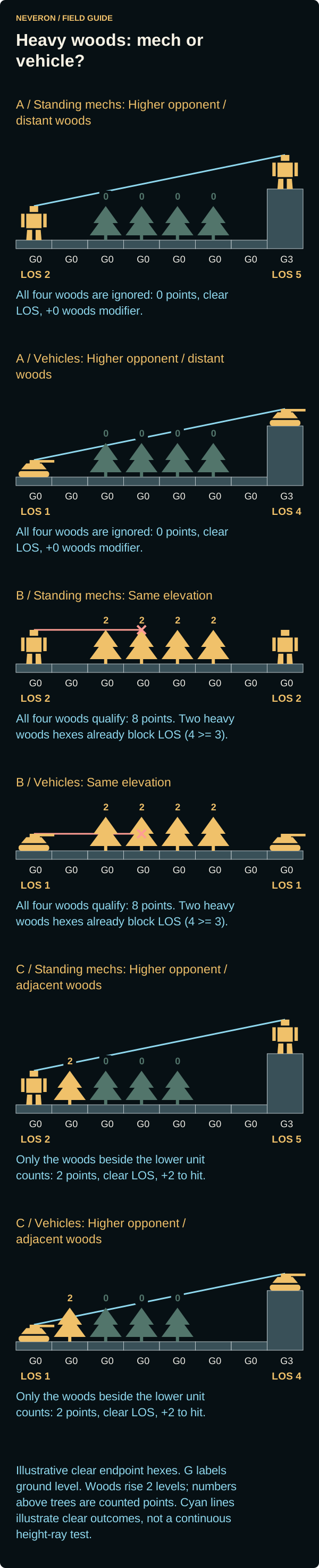
| Example | Standing-mech LOS heights | Vehicle LOS heights | Result for both types |
|---|---|---|---|
| A: higher opponent, distant woods | Ground 0 and 3: LOS 2 and 5. | Ground 0 and 3: LOS 1 and 4. | Four heavy woods hexes have treetops at 2 and none is adjacent to the lower unit. All are below the higher unit's LOS height: clear LOS, +0 intervening woods modifier. |
| B: same elevation | Both on ground 0: LOS 2 and 2. | Both on ground 0: LOS 1 and 1. | Treetops at 2 reach both units' heights. All four heavy woods hexes qualify. Two already give 4 points and block LOS. |
| C: higher opponent, adjacent woods | Ground 0 and 3: LOS 2 and 5. | Ground 0 and 3: LOS 1 and 4. | Only the heavy woods hex adjacent to the lower unit qualifies: its treetops reach or exceed that unit's height. Clear LOS, +2 intervening woods modifier. |
Whether direct LOS is blocked is mutual in these land examples. Partial cover and the complete attack modifiers can differ when firing in the opposite direction. Clear LOS means a direct sight line exists; it does not mean the attack has no penalties or is automatically legal.
Moving back one hex
Moving away from an adjacent hill can open LOS, but the new elevation and unit type matter. These side views keep the old hex at ground 5, the next hill at 6 and the opponent at 7. Compare moving back onto ground 5 with moving back onto ground 4. Standing mechs add 2 levels, so the opponent's LOS height is 9; vehicles add 1, so the opponent's LOS height is 8.
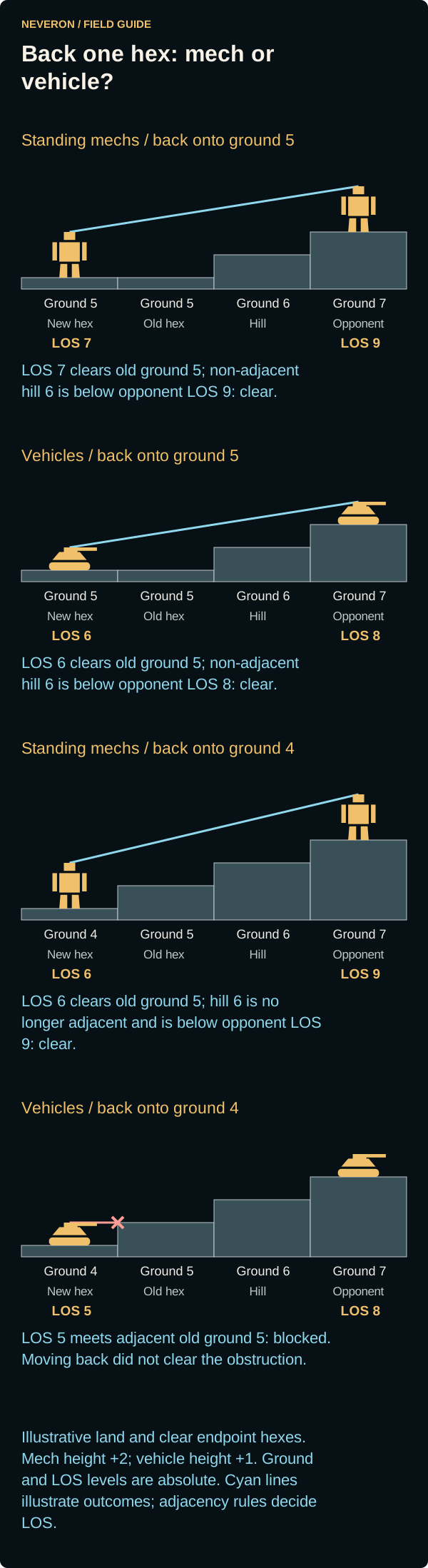
| New hex | Standing mechs | Ground vehicles |
|---|---|---|
| Ground 5 | LOS height 7. The old ground-5 hex is below it; the non-adjacent level-6 hill is below the opponent's LOS height 9. Clear LOS. | LOS height 6. The old ground-5 hex is below it; the non-adjacent level-6 hill is below the opponent's LOS height 8. Clear LOS. |
| Ground 4 | LOS height 6. The old ground-5 hex is still below it. The level-6 hill is no longer adjacent and is below the opponent's LOS height 9. Clear LOS. | LOS height 5. The adjacent old ground-5 hex reaches that height and blocks LOS, despite moving away from the level-6 hill. |
These are schematic land examples with clear endpoint hexes, not a reconstruction of a particular battle. Check your map's actual elevations, unit posture, roofs, smoke and woods before applying an example.
Does the middle level-6 hex count?
Consider five consecutive hexes along the LOS at ground levels 4, 5, 6, 7 and 8, with a standing mech at each end. The shooter's LOS height is 6 and the target's is 10. Put woods on the adjacent ground-5 hex and the middle ground-6 hex; ground 7 and the target hex are clear. Assume no smoke or buildings.
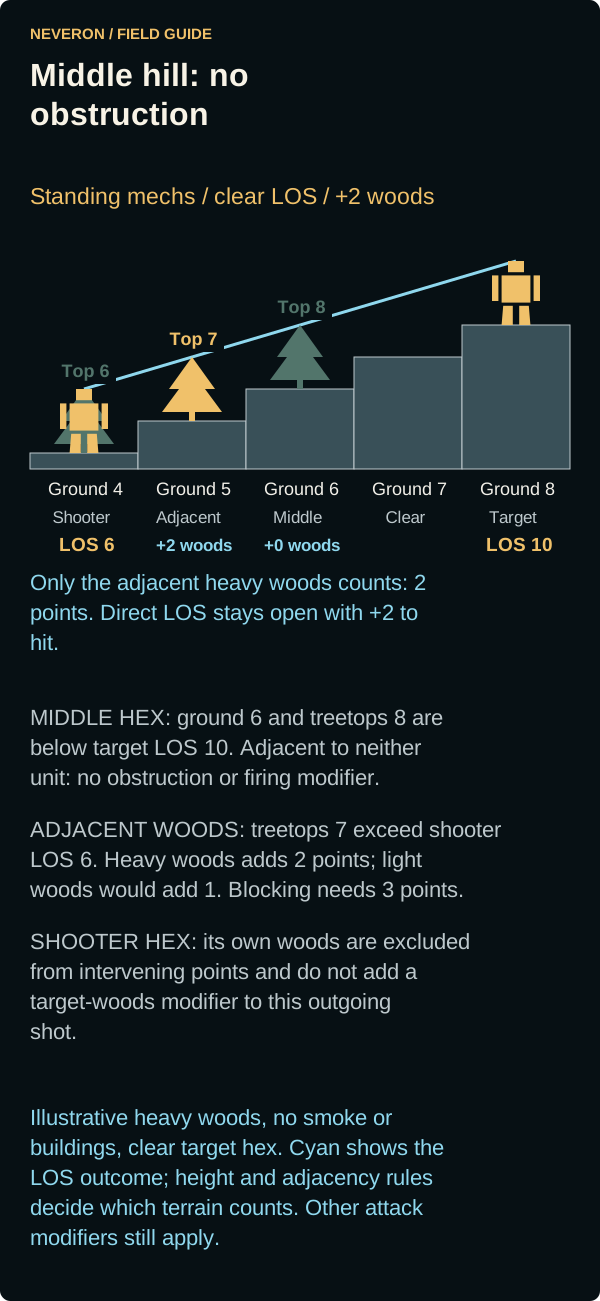
| Intervening hex | Height and adjacency test | Effect on this shot |
|---|---|---|
| Ground 5, beside the shooter | The ground is below shooter LOS 6. Its treetops are 7, which exceeds the adjacent shooter's LOS height. | The ground does not block. Woods qualify: light woods gives 1 point and +1 to hit; heavy woods gives 2 points and +2. |
| Middle ground 6 | Adjacent to neither unit. Ground 6 and treetops 8 are both below the higher LOS height 10, so neither reaches both units' LOS heights. | No LOS obstruction, no firing modifier and no partial cover from this hex. Its woods contribute 0 points. |
| Ground 7, beside the target | The clear ground is below adjacent target LOS 10 and does not reach both LOS heights. It is also below the level-9 height required for target partial cover. | No LOS obstruction, firing modifier or partial cover from this hex. |
This height arrangement leaves direct LOS open: only the adjacent ground-5 woods count, giving +1 for light woods or +2 for heavy woods. Reaching the shooter's LOS height makes woods qualify; it does not make one woods hex block the shot automatically. Blocking requires at least 3 combined intervening woods/smoke points. Woods in the shooter's own hex do not enter that total or add a target-woods modifier to this outgoing shot.
Equal ground and LOS heights do not create a penalty by themselves. The middle ground-6 hex would block a shooter at LOS height 6 if it were adjacent to that shooter; in this five-hex arrangement it is not. Distant woods would count if their treetops reached both units' LOS heights. Evaluate those conditions again whenever positions, elevations or terrain change.
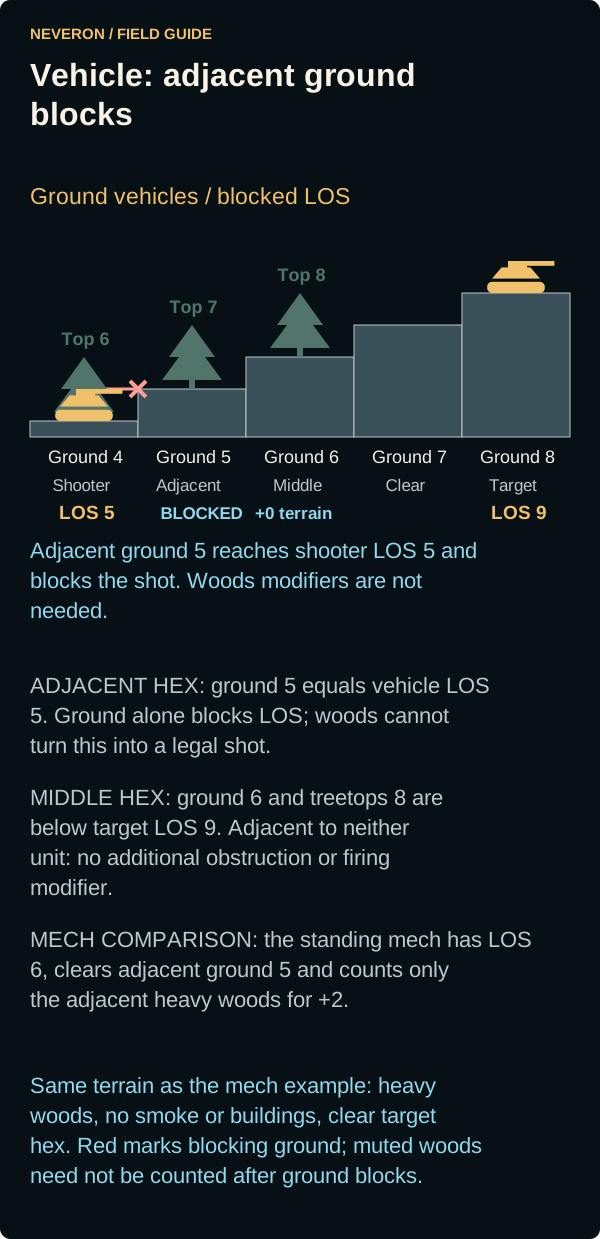
Vehicle version of the same terrain: the shooter's LOS height becomes 5 and the target's becomes 9. The adjacent ground-5 hex now reaches the shooter's LOS height and blocks direct LOS on ground height alone, before counting woods. There is no legal direct shot to which a woods firing modifier can be applied. The middle ground-6 hex and its treetops at 8 remain below the higher LOS height 9 and adjacent to neither unit, so they still add no obstruction or firing modifier.
Woods and smoke together
Qualifying smoke and intervening woods share the same obstruction total: fewer than 3 points leaves direct LOS open and adds that many to the attack target number; 3 or more blocks it. Smoke must overlap the relevant LOS heights: its base cannot be above both units, and its top must satisfy an intervening-height condition. Qualifying cloud densities in one hex add together, capped at 2 smoke points for that hex; qualifying woods in that hex still add their own points.
These examples use standing mechs on level ground with clear endpoint hexes. Their LOS heights and the treetops are 2; the depicted density-1 smoke spans levels 0 to 2 and qualifies. With no woods or smoke, there is no obstruction penalty. Light woods plus that smoke gives 1 + 1 = 2 points and +2 to hit. Heavy woods plus the same smoke gives 2 + 1 = 3 points, blocking direct LOS. Smoke can occupy a hex that is not itself burning.
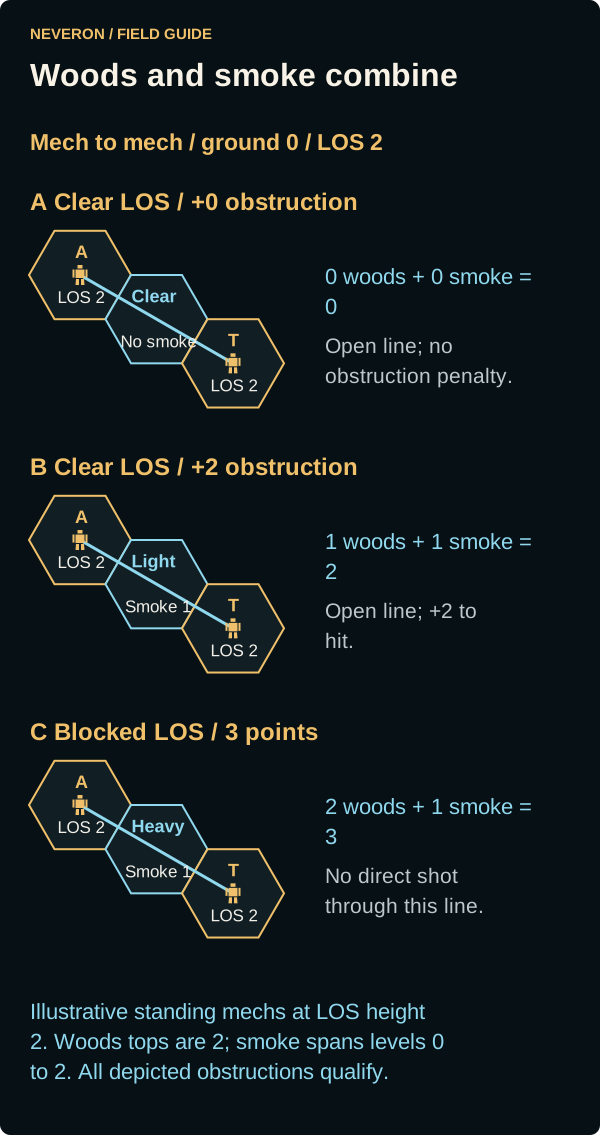
Tanks: both tanks have LOS height 1. Woods tops at 2 and the illustrated smoke from levels 0 to 2 still qualify, so the three outcomes remain 0 points, 2 points with +2 to hit, and blocked LOS at 3 points. The same obstruction totals apply to a mixed standing-mech/tank pair under these assumptions.
Partial cover and other limits
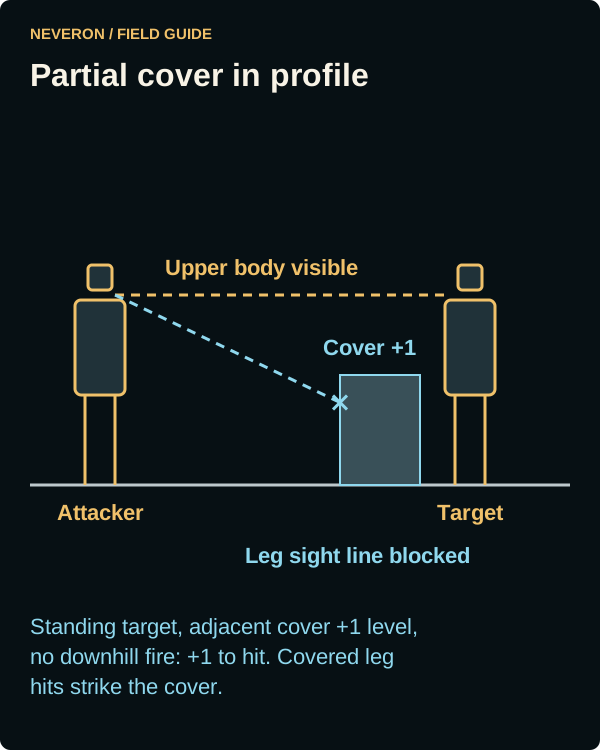
Terrain/building partial cover applies to a standing mech when adjacent cover reaches one level above its base and the attacker is not firing downhill. It adds +1 to the attack. A leg hit intercepted by that cover hits the covering terrain or building instead of the leg; building cover can take damage. Shallow-water cover uses its own submerged-location handling. Inspect the hit log rather than assuming that every partial-cover hit uses an upper-body table.
Smoke can also add intervening obstruction and attack modifiers; do not assume woods are the only reason a line is blocked. After moving, select the enemy and check the server's accepted weapon preview. Range, firing arcs, ammunition and unit condition still apply. A friendly spotter may enable an eligible indirect-fire weapon when the launcher lacks direct LOS; ordinary direct-fire weapons do not gain that ability from a sensor contact.
Weapon declarations, arcs and range
Select an enemy and inspect the weapon rows. Each row shows its mounting location, current chance and relevant ammunition. Choose weapons and use Fire to declare them. Unused weapons may then be declared against another target; Multi target mode prepares split fire before submission. A declared weapon is committed, and firing from a limb can prevent a physical attack with that limb.
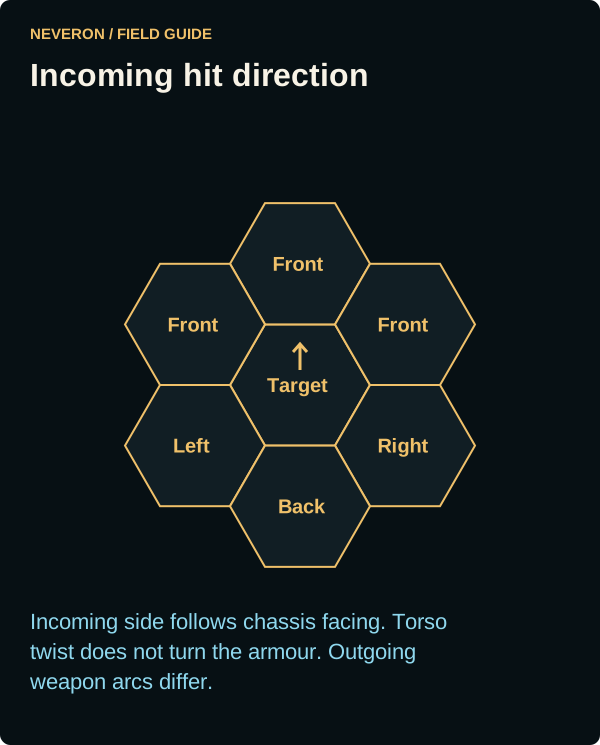
Left-arm, right-arm, torso, rear and turret mounts do not share identical arcs. Standing bipeds can use the permitted torso twist to bring weapons to bear, but all declarations must share a compatible twist. Earlier declarations narrow the remaining choices. Prone and quad mechs stay aligned with their chassis. Torso twist does not turn rear armour into front armour: incoming hit direction uses the target's chassis facing.
A ranged target number combines Gunnery, attacker movement, target movement, range, LOS/terrain, heat, damage and applicable attack-specific modifiers. The weapon's displayed ranges come from its equipment profile.
| Range | Ordinary modifier |
|---|---|
| Short | +0, plus any minimum-range penalty |
| Medium | +2 |
| Long | +4 |
| Beyond long | No legal normal shot |
Within minimum range, the added penalty is minimum range minus distance plus one. For example, minimum range 3 at distance 2 adds +2. Damaged or destroyed equipment, depleted ammunition, incompatible arcs and illegal LOS can prevent a declaration even when the target is close.
Review heat before committing a volley. Ammo-fed weapons draw from their available bins; Dump empties the selected bin to reduce explosion risk at the cost of losing its remaining ammunition. Aimed-shot eligibility depends on the weapon and disabled target state; it is not a general choice of hit location against an active enemy.
Ordinary ammunition-fed shots spend one round each, including misses. Ammunition stays spent between rounds of the same fight and when you reconnect. A new Neveron Arena duel starts with fresh ammunition for its design. Area effects stop at the tactical map boundary; nearby hexes inside the map still receive their normal splash damage. The boundary correction requires the next compatible game update.
Preview weapon reach on the map
In Empire Management → Game Settings → Combat, Show firing arcs and weapon ranges is on by default. Uncheck it and select Done to hide the previews and their firing-popup controls. Your choice is saved to your account. Normal weapon status, hit chances and firing rules still apply.
With the compatible combat update, selecting a target shows Arcs, Ranges and Selected weapons controls in the firing popup. Selected weapons show thin outlines over actual hexes. Hover a weapon row or focus it with the keyboard to fill only that weapon's reachable hexes, without changing its target or selection. Turn off Selected weapons to inspect all available weapon profiles.
Each swatch matches its map outline, label and assigned-target line. Matching weapon profiles share an outline labelled with their count. Solid, dashed and dotted range boundaries distinguish short, medium and long reach. Hatched minimum-range hexes remain reachable with a minimum-range penalty. Shot lines keep their endpoints at the real attacker and target centres.
The popup stays inside the visible map. Scroll the weapon list for longer loadouts; heat and action buttons stay below the list. Weapon rows retain their normal status, assigned target and hit chance without an extra arc/distance/range line.
These overlays show geometry. Woods, cover, ammunition, damage, posture and other restrictions still affect the normal weapon status and hit chance. Stale or unavailable profiles omit the preview. Quad front-leg weapons use body-facing arcs; turret weapons must share one facing compatible with all their assigned targets. Dismissing the popup or leaving the firing phase clears the preview.
Indirect fire
The firing popup names the selected spotter above the weapon list. Each available weapon shows its percentage chance to hit; target numbers and range modifiers are omitted from the weapon rows.
Only weapons with indirect-fire capability can use a spotter. The launcher need not see or electronically detect the target itself, but an eligible friendly unit must have clear or partial visual LOS. Range is measured from launcher to target; terrain and partial cover come from the spotter's sight line. Add the spotter's movement, +1 for indirect fire and +1 if the spotter also declares an attack.
The attacking-spotter modifier is finalized before resolution and may make an earlier preview worse. If that makes a weapon's final target number exceed 12, the shot is canceled without firing. A canceled spotter shot still counts as a declaration for that exchange's spotter penalty.
Damage, armour and critical hits
A successful weapon attack still needs a hit location. Facing determines front, side or rear exposure, then the weapon/attack uses its applicable location table. Armour protects that location; penetrating damage reaches internal structure and can damage components. Losing an arm, leg, torso, weapon, actuator, engine component or gyro can change available actions before the unit is entirely destroyed. Crew death also removes a unit from combat.
Cluster weapons roll for the amount that hits and can apply separate damage groups to different locations. Area-effect weapons can affect nearby hexes according to their equipment profile. Damage and heat damage are separate effects. Do not treat a salvo's nominal maximum as guaranteed damage, or add advanced ammunition modes merely because the weapon name exists in the catalogue.
Armour, internal structure and critical summaries in the selected-unit panel explain losses of mobility, firepower and stability. The battle log distinguishes misses, cover interception, ordinary damage, critical events and destruction. A destroyed unit can still complete an eligible same-phase attack or required fall; removal happens after the relevant resolution.
Ordinary biped ranged hit locations
After a hit, the ordinary location roll is 2D6. This table uses the incoming side of the target; physical, aimed, quad-specific and cover-intercepted attacks can use different handling.
| Roll | Front | Back | Left | Right |
|---|---|---|---|---|
| 2 | Center torso | Rear center torso | Left torso | Right torso |
| 3 | Right arm | Right arm | Left leg | Right leg |
| 4 | Right arm | Right arm | Left arm | Right arm |
| 5 | Right leg | Right leg | Left arm | Right arm |
| 6 | Right torso | Rear right torso | Left leg | Right leg |
| 7 | Center torso | Rear center torso | Left torso | Right torso |
| 8 | Left torso | Rear left torso | Center torso | Center torso |
| 9 | Left leg | Left leg | Right torso | Left torso |
| 10 | Left arm | Left arm | Right arm | Left arm |
| 11 | Left arm | Left arm | Right leg | Left leg |
| 12 | Head | Head | Head | Head |
When penetrating damage leaves internal structure remaining, the ordinary critical-count roll gives no critical at 2–7, one at 8–9, two at 10–11 and three at 12. Destroying a location has its own consequences and transfer handling. Critical slots determine the affected equipment; a critical is not an automatic whole-unit kill. Three engine hits destroy a mech; two gyro hits destroy the gyro and cause a fall. Ammunition explosions can injure the pilot and propagate damage independently of ordinary armour protection.
Cluster-hit reference
For a weapon using one of these cluster tables, roll 2D6 to determine hits after the attack succeeds. Columns show the nominal cluster size, not damage per hit. The weapon profile determines damage and damage grouping.
| Roll | 2 | 4 | 5 | 6 | 10 | 15 | 20 | 30 | 40 |
|---|---|---|---|---|---|---|---|---|---|
| 2 | 1 | 1 | 1 | 2 | 3 | 5 | 6 | 9 | 12 |
| 3 | 1 | 2 | 2 | 2 | 3 | 5 | 6 | 9 | 12 |
| 4 | 1 | 2 | 2 | 3 | 4 | 6 | 9 | 14 | 18 |
| 5 | 1 | 2 | 3 | 3 | 6 | 9 | 12 | 18 | 24 |
| 6 | 1 | 2 | 3 | 4 | 6 | 9 | 12 | 18 | 24 |
| 7 | 1 | 3 | 3 | 4 | 6 | 9 | 12 | 18 | 24 |
| 8 | 2 | 3 | 3 | 4 | 6 | 9 | 12 | 18 | 24 |
| 9 | 2 | 3 | 4 | 5 | 8 | 12 | 16 | 24 | 32 |
| 10 | 2 | 3 | 4 | 5 | 8 | 12 | 16 | 24 | 32 |
| 11 | 2 | 4 | 5 | 6 | 10 | 15 | 20 | 30 | 40 |
| 12 | 2 | 4 | 5 | 6 | 10 | 15 | 20 | 30 | 40 |
Physical attacks
Use the displayed Punch, Kick or Hatchet control when offered. These are separate from Fire and require legal range, arc, height, posture and working equipment. Punch reserves its eligible arm or arms; a queued weapon in one arm can still leave the opposite arm available. Kick and hand weapons require their participating locations to be unused.
| Action | Current behavior |
|---|---|
| Punch | Each eligible arm attacks separately. Undamaged baseline damage is weight divided by 10, rounded up. Arm actuators can reduce damage and worsen the roll. Normally uses upper-body locations at equal height. Vehicles can be punched only when one level higher; a prone equal-height target cannot be punched. |
| Kick | Undamaged baseline damage is weight divided by 5, rounded up. Base Piloting modifier is -1 before movement, terrain and condition. Requires usable legs/hips, an eligible forward target at the same level or one lower, and no depth-one/deeper water. A miss requires the attacker to check balance; a hit requires a standing mech defender to check balance. |
| Hand weapon | Requires an equipped, functional hand weapon and a usable, uncommitted mounting limb. Use the offered attack and preview; owning a mech does not grant a generic Hatchet attack. |
| Charge | Declared through legal ground movement into the target. Baseline defender damage is the attacker's weight divided by 10, rounded up, multiplied by its recorded charge distance. The attacker also takes recoil based on defender weight. Displacement resolves after the physical exchange. |
| Death From Above (DFA) | Requires legal jump capacity and an enemy landing target. Baseline defender damage is three times the attacker's weight divided by 10, rounded up before multiplying. The attacker also risks damage and falls; this is not ordinary jump movement onto an occupied hex. |
| Quad mech | Uses its own limb and kick eligibility. Do not apply biped torso-twist or arm assumptions to it. |
For a healthy 50-ton biped, an ordinary punch starts at 5 damage per eligible arm, a kick at 10 and a DFA at 15 before attack-specific effects. Infantry use the casualty conversion below instead of receiving these armour-damage values directly.
Current charge aftermath moves a surviving defender one hex along the entry line, with a +2 balance check. Occupants can dodge or be displaced in a domino chain. Each step is limited to one uphill terrain level. A blocked current charge displacement can destroy the blocked unit; the planned push rule prohibits off-map displacement. Pending charge correction: a forced drop of two or more levels must cause an automatic, height-based fall for Charge as well as Push. Current local charge displacement does not yet implement that complete fall behavior.
A Charge defender can retaliate using the charger's retained approach direction if its own physical attack is legal. A DFA attacker is not an eligible retaliation target. If the intended DFA target stops being a legal occupant, the entire DFA move is rejected rather than shortened into an ordinary jump.
Falls, standing and pilot injury
Piloting checks test whether a mech remains stable. Triggers include relevant damage/critical events, 20 or more damage in one attack phase, missed kicks, being kicked or charged, shutdown and hazardous movement. Damage of at least 20 in a phase requires a +1 balance check when applicable. Falls can cause chassis damage and pilot injury, including when a same-phase attack has already destroyed the mech.
A prone mech has different movement, firing and physical eligibility. Use the available stand action during Movement. Attempts consume movement and can fail; a failed stand-up roll leaves the mech prone without inventing another fall or fall-damage event. Standing does not restore destroyed legs, actuators or gyro components.
Pilot injuries can cause unconsciousness and eventually death. The ordinary consciousness targets for successive injury levels are 3, 5, 7, 10, 11 and 13 on 2D6. An unconscious pilot cannot issue ordinary combat actions or voluntarily eject. Watch the pilot state separately from chassis health.
Heat and shutdown
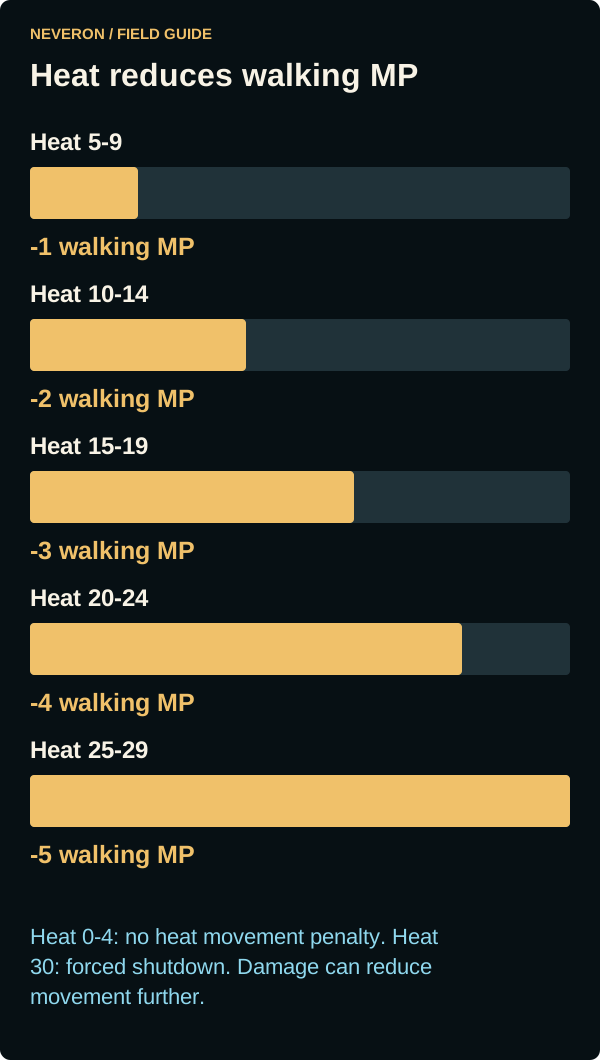
Mechs accrue heat from movement, firing, equipment damage and incoming heat effects. Heat sinks remove heat during heat resolution; water and sink condition affect cooling. The display distinguishes current heat from projected heat. End-of-turn heat is bounded between 0 and 30 in the reviewed implementation.
| Heat | Walking MP reduction | Heat | Weapon attack penalty |
|---|---|---|---|
| 0–4 | 0 | 0–7 | +0 |
| 5–9 | 1 | 8–12 | +1 |
| 10–14 | 2 | 13–16 | +2 |
| 15–19 | 3 | 17–23 | +3 |
| 20–24 | 4 | 24–30 | +4 |
| 25–29 | 5 | 30 | Forced shutdown |
| Heat | Shutdown avoidance target | Heat | Ammunition explosion avoidance target |
|---|---|---|---|
| 0–13 | No heat shutdown check | 0–18 | No heat explosion check |
| 14–17 | 4+ | 19–22 | 4+ |
| 18–21 | 6+ | 23–27 | 6+ |
| 22–25 | 8+ | 28–30 | 8+ |
| 26–29 | 10+ | Ammo absent | No bin available to explode |
| 30 | Automatic shutdown | Heat injury | Damaged life support can injure the pilot from heat 15 |
New shutdown can cause a +3 balance check and fall. Restart requires a conscious pilot and the applicable heat check. Cooling can restore heat-limited movement on later turns but cannot repair component damage. Vehicle and infantry damage rules differ from mech heat management; do not apply this heat scale to every unit.
Quad-mech rules
Quads share the mech heat, armour, pilot and equipment systems, with four legs and their own stability and physical-attack rules. These sections describe current local Neveron behavior, including differences from biped rules. Check the live action preview for your damaged unit's remaining options.
Four leg locations, facing and cover
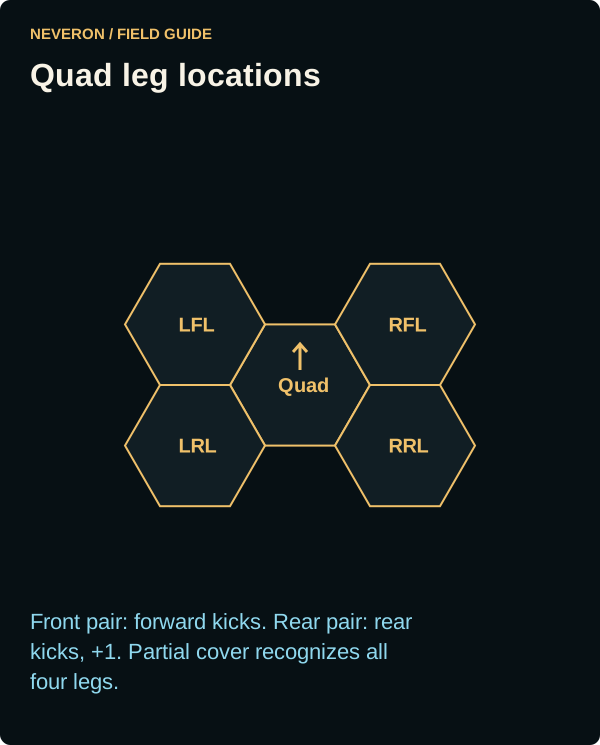
LFL and RFL mean left/right front leg; LRL and RRL mean left/right rear leg. In an ordinary ranged location table, the biped's left/right arm entries become the quad's front legs, and the biped's left/right leg entries become its rear legs. Front legs use leg actuator rules, rather than arm actuator rules.
Quads do not torso twist. Weapon arcs follow the chassis and mounting location; the biped arm-actuator weapon penalties do not apply to quad front legs. Partial-cover interception recognizes all four legs. An attack intercepted at a front-leg location is not an uncovered arm hit.
Quad kicks and other physical attacks
| Rule | Current quad behavior |
|---|---|
| Front kicks | The three forward target bearings use the front-leg pair. |
| Rear kicks | The three rear target bearings use the rear-leg pair. Add +1 compared with a front kick. |
| Required legs | Both legs in the selected pair must be present with working hips. A weapon declared in either selected leg prevents that kick; the other pair is separate. |
| Target and terrain | Adjacent target at equal elevation or one level lower. A prone target one level lower is ineligible. No kicks from depth-one/deeper water. |
| Roll and damage | Modified base Piloting -1, then rear-kick +1 where applicable, movement, terrain and posture. Undamaged damage is weight ÷ 5 rounded up. Upper/lower-leg actuator damage reduces damage using the less-damaged leg in the selected pair. |
| Balance | A miss requires the quad's balance check; hitting a standing mech requires the defender's balance check, as with a biped kick. |
| Punch and hand weapons | Unavailable. Front legs do not grant Punch or Hatchet attacks. |
| Charge and DFA | Use ordinary admission and resolution when legal. Current charge admission requires both rear legs present; DFA also needs working jump capability. Losing any leg disables jumping. |
For a healthy quad with Piloting 5, the four-leg bonus makes base Piloting 3. A front kick starts at target 2 and a rear kick at 3 before movement, terrain and other modifiers. A healthy 50-ton quad starts at 10 kick damage. Against infantry, convert that damage to casualties using the infantry table.
Quad Piloting, standing and leg loss
| Condition | Current effect before heat and other damage |
|---|---|
| Four legs present | -2 to base Piloting. A conscious, active prone quad with a usable gyro stands without a roll: 2 MP and +1 heat. |
| One leg destroyed | Lose the -2 four-leg bonus and reduce base walk by 1 MP. Jumping is disabled; standing uses the normal roll path. |
| Two legs destroyed | +5 leg-loss Piloting modifier and base walk 1 MP. Ground movement is capped at 1 MP; jumping is disabled. |
| Three legs destroyed | Quad destroyed. |
| Hip damage on a surviving leg | +2 Piloting per affected hip; -2 base walk per affected hip when fewer than two legs are destroyed. |
| Upper leg, lower leg or foot damage | +1 Piloting per damaged actuator on surviving legs; -1 base walk each when fewer than two legs are destroyed. For Piloting, a hip hit replaces the other actuator penalties on that same leg; movement reductions still accumulate. |
| Gyro damage | +3 base Piloting when damaged; a destroyed gyro prevents standing. Running/jump landing with relevant gyro or leg damage can require a balance check. |
Base walk cannot fall below zero. Heat further reduces the remaining movement shown in the unit panel. With two destroyed legs, the 1 MP ground cap still applies even if the run readout is larger. Having all four legs present does not repair damaged actuators, remove heat or restore a destroyed gyro.
Ground movement into depth-one water checks modified Piloting -1; depth-two water checks modified Piloting. Jump landing in water checks modified Piloting. A failed check can cause a fall and truncate the route. A quad's four-leg bonus is already part of these modified checks.
Physical hit locations against a quad
These are the current 1D6 tables used when an incoming attack calls for an upper-body (punch) or lower-body (kick) table. The quad itself cannot punch. Relative elevation and posture decide which table an attack uses; ordinary ranged attacks use the standard ranged table with the leg substitutions above.
| Roll | Front upper | Back upper | Left upper | Right upper | Front lower | Back lower | Left lower | Right lower |
|---|---|---|---|---|---|---|---|---|
| 1 | LFL | LRL | Left torso | Right torso | RFL | RRL | LFL | RFL |
| 2 | Left torso | Rear left torso | Left torso | Right torso | RFL | RRL | LFL | RFL |
| 3 | Center torso | Rear center torso | Center torso | Center torso | RFL | RRL | LFL | RFL |
| 4 | Right torso | Rear right torso | LFL | RFL | LFL | LRL | LRL | RRL |
| 5 | RFL | RRL | LRL | RRL | LFL | LRL | LRL | RRL |
| 6 | Head | Head | Head | Head | LFL | LRL | LRL | RRL |
Planned push attacks exclude ordinary quads; the later push section does not add a quad push action.
Vehicle rules
Vehicles use cruising/flanking movement, chassis and turret arcs, separate armour locations and crew conditions. They can charge through a legal movement declaration, but do not Punch, Kick, use mech hand weapons or perform DFA. The current Eject action is for BattleMechs. Vehicles do not accumulate or resolve heat on the mech heat scale; direct damage, crew casualties and explosions still apply.
Terrain, movement and weapon arcs
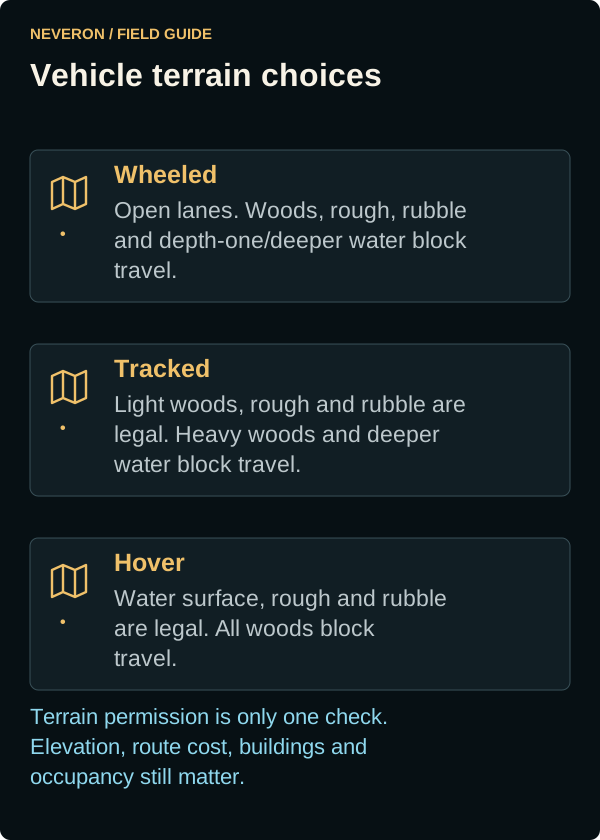
| Movement mode | Light woods | Heavy woods | Rough/rubble | Depth-one/deeper water |
|---|---|---|---|---|
| Wheeled | Blocked | Blocked | Blocked | Blocked |
| Tracked | Allowed | Blocked | Allowed | Blocked |
| Hover | Blocked | Blocked | Allowed | Allowed over the surface |
Depth-zero water uses its separate shallow terrain rules; do not confuse it with depth-one water. Vehicle ground routes pay for turns, terrain and legal elevation changes. Hover water steps use surface movement cost 1 without following the underwater bed's elevation; land obstacles still matter. Backup uses the cruising allowance. Ordinary attack movement modifiers are +0 stationary, +1 cruising and +2 flanking, plus the target's movement and other attack modifiers.
Front, rear, left and right hull weapons use their own mounting arcs. An unlocked turret can bear in any direction, subject to ordinary range and LOS. A locked turret fires only within its retained turret arc. Turning the hull turns the locked turret with it while preserving its angle relative to the hull; it does not restore free rotation. Propulsion loss or an engine hit can immobilize a vehicle without by itself destroying its working weapons.
Incoming vehicle hit directions
The vehicle hit-direction correction described here awaits the next game update. Incoming hits use the hull's facing: the front and rear each cover 60 degrees, while the left and right each cover 120 degrees. A shot 60 degrees to the hull's right therefore hits from the right. Turning a turret does not change which hull side an incoming attack uses.
Exactly on a front/side boundary, the hit uses the front; exactly on a side/rear boundary, it uses that side. Physical attacks use the target's saved hull facing, and splash arrives from the explosion's location. The BattleMech diagram above describes BattleMech incoming sectors; vehicle sectors follow the rules in this section.
Vehicle hit locations and destruction
| 2D6 location roll | Attack from front/back | Attack from left/right |
|---|---|---|
| 2–9 | Facing hull side | Facing hull side |
| 10–11 | Turret | Turret |
| 12 | Turret | Facing hull side |
A turret result on a turretless vehicle redirects to the facing hull side. Armour is consumed before that location's internal structure. Exhausting any hit location's internal structure, including the turret, destroys the vehicle. Crew death, ammunition explosion or an internal-combustion fuel explosion can also destroy it; merely reducing movement to zero is a different state.
Neveron's vehicle critical-hit gate
Vehicles use a separate floating-critical system. After a nonfatal hit, the critical gate's chance is 1 minus current defensive Battle Value divided by original defensive Battle Value, bounded between 0% and 100%. It is recalculated as damage changes the vehicle. When the struck location has no armour remaining, the gate passes automatically. This is not simply the vehicle's overall health percentage or the mech internal-critical table.
Only after that gate passes does the original 2D6 hit-location roll select the possible effect below. A gate pass does not guarantee an effect on every location roll.
| Original location roll | Effect after the gate passes |
|---|---|
| 2 or 12 | Roll 1D6 on the equipment/crew table below. |
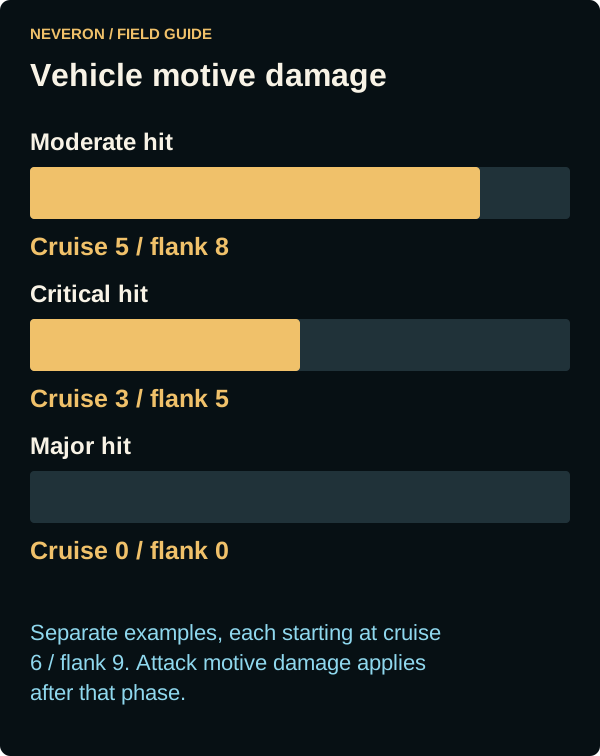
| 3 | Major motive damage: propulsion destroyed after the attack phase. |
| 4 or 5, front/back attack | Moderate motive damage: cruising MP -1 after the attack phase, minimum zero. |
| 4 or 5, left/right attack | Critical motive damage: halve cruising MP after the attack phase, rounding up. |
| 9 | For a hover vehicle hit from left/right, the same critical motive effect. Otherwise no effect from this entry. |
| 11 | Lock an existing, unlocked turret. |
| 6–8 or 10 | No additional critical effect from this table. |
| Equipment/crew roll, 1D6 | Effect |
|---|---|
| 1 | Crew stunned: ordinary movement and firing are unavailable until round-end recovery clears the stun. |
| 2 | Main weapon jam: temporarily disables the selected strongest eligible weapon; the log reports jam and recovery. |
| 3 | Engine hit: cruising and flanking movement become zero. |
| 4 | Crew killed: vehicle destroyed. |
| 5 | Internal-combustion engine: fatal fuel explosion. Other engine types: engine hit and no movement. |
| 6 | Fatal ammunition explosion if an owned ammunition bin still contains rounds; otherwise no explosion. |
Motive hits from attacks are queued until that attack phase ends, then applied in order. Moderate/critical hits recalculate flank MP as 1.5 times remaining cruising MP, rounded up. For example, cruising 6/flanking 9 becomes 5/8 after one moderate hit, 3/5 after one critical hit, or 0/0 after a major hit. Those are separate examples starting from 6/9, not one damage sequence.
Driving through buildings
Each new building entry checks modified Piloting plus the structure modifier and the target-movement modifier for ground hexes moved so far that round. Structure modifiers are +0 light, +1 medium, +2 heavy and +5 hardened.
A failure inflicts damage equal to current building CF ÷ 10, rounded up, on the front hull when driving forward or rear hull when reversing. This is a body impact, not a random turret hit. It also checks mounted-infantry collision damage and immediately rolls building-entry motive damage; the building takes its own entry interaction. Damage can reduce or stop the remaining route and cancel a charge that no longer reaches its target.
For the building-entry motive roll, add +0 tracked, +2 wheeled or +3 hover to 2D6, and another +1 for rear impact. Apply the modified result:
| Modified result | Immediate effect |
|---|---|
| 5 or less | No motive effect. |
| 6–7 | Retain +1 driving penalty; no speed reduction. |
| 8–9 | Retain +2 driving penalty; cruising MP -1, minimum zero, then recalculate flank MP. |
| 10–11 | Retain +3 driving penalty; halve cruising MP, rounding up, then recalculate flank MP. |
| 12 or more | Propulsion destroyed; cruising/flanking MP become zero. |
Retained driving penalties of different levels add. Repeating the same penalty level does not add that driving penalty again, although the new damage roll can reduce speed again. Unlike attack-induced motive damage, these movement-entry effects apply immediately.
Building collapse clears vehicle interior occupancy and deals damage equal to weight ÷ 10 rounded up, multiplied by at least one building-height level, in groups of up to 5. It also checks mounted-infantry fall damage. The new terrain-destruction work preserves these existing building rules.
Infantry and transport
Conventional infantry casualties
Against conventional infantry, a mounted weapon's successful complete hit is converted to casualties. Let D be damage after any cluster-hit roll and applicable absorption. Round each formula upward. Apply conversion once to the whole hit, then double casualties for exposed infantry. Special weapon dice take precedence over the ordinary category.
| Weapon/attack category | Casualties before exposure |
|---|---|
| Ordinary direct ballistic/energy; mech physical attack | D ÷ 10, rounded up |
| Cluster ballistic | D ÷ 10, rounded up, then +1 |
| Ordinary pulse | D ÷ 10, rounded up, then +2 |
| Missile | D ÷ 5, rounded up |
| Area effect | D ÷ 0.5, rounded up |
| Machine Gun | 2D6 |
| Small Pulse Laser | 2D6 |
| Flamer | 4D6 |
Woods and qualifying intact-building protection prevent exposure doubling. Rough, rubble, road and other unprotected ground do not provide this protection just because they cost movement. Intervening woods elsewhere on the sight line do not protect a squad standing in open ground.
Examples: a 5-damage Medium Laser causes 1 casualty in protected terrain or 2 exposed. A missile hit totaling 12 damage causes 3 or 6 casualties; do not separately round each missile. Environmental damage and infantry's own attacks retain their own handling.
Mounted infantry
Use the available transport controls to load and unload eligible squads. Capacity, position, movement mode, terrain and stacking all matter. Motorized and jump infantry cannot bypass building restrictions by unloading inside a building.
When a ground carrier is destroyed, roll one die independently per mounted squad: 1–4 survives intact; 5–6 loses the entire squad. Survivors are placed in the carrier's final hex or a legal adjacent hex. No legal space or prohibited terrain can still destroy them. Survivors are targetable during recovery and may move and fire from the following turn.
A damaging fall, skid, sideslip, collision or displacement event separately rolls per mounted squad: 1–4 causes no casualty; 5–6 causes exactly one casualty, without exposure doubling. A fatal movement event can require this check followed by the separate carrier-destruction survival roll.
Buildings and defensive structures
Inspect a building hex to see its levels and Construction Factor (CF). Buildings already take combat damage and can collapse into rubble. They block sight according to their roof elevation, can provide partial cover and can shelter eligible occupants. Ground entry and rooftop occupancy have different checks. Rooftop loads must fit the building's support capacity.
Direct building attacks, damage passing through building cover and applicable impacts can reduce CF. A collapse changes the terrain and affects occupants, including falls from elevated positions. Existing local collapse handling can happen immediately when damage exhausts CF. Building targeting, CF, support, collapse timing and occupant damage remain unchanged by the non-building terrain rules below.
Defensive towers are combat structures with their own weapons and condition. Their attacks participate in the battle's resolution. Tactical damage does not by itself prove that strategic Land War destruction, persistent terrain damage or repair settlement is available. See Tower design and placement and War Room and Land War for those boundaries.
Ejection, elimination and reconnect
Eject requires a controlled BattleMech, a living conscious pilot, an eligible transport state and Movement phase. Read the current odds and financial consequences before confirming. The pilot lands behind the mech and checks Piloting with the applicable terrain and condition modifiers; failure causes injury according to the failure margin.
Voluntary public FFA/PVE ejection forfeits cash earned during the current entry and ends its periodic pay. Automatic ejection is exempt from that forfeiture. In betting matches, the preview states whether a fee is waived, reduced or standard, with current condition and limits included. Ejection can credit the opponent a mech kill; ejecting the last unit forfeits a private/betting match or ends the player's public entry.
Ammunition explosions can trigger automatic ejection, subject to pilot survival and match-specific handling. Neveron Arena settlement preserves pilot injury/progression without persisting chassis damage. Do not assume that every arena uses strategic permanent-loss rules.
After public elimination, review results and choose Exit Arena; re-enter deliberately for a new unit. Reconnect restores the existing entry or its final result where supported, rather than granting a new entry. If it is unavailable, exit and join through Arenas. Read Pilot rehabilitation for injured strategic pilots.
Push attacks
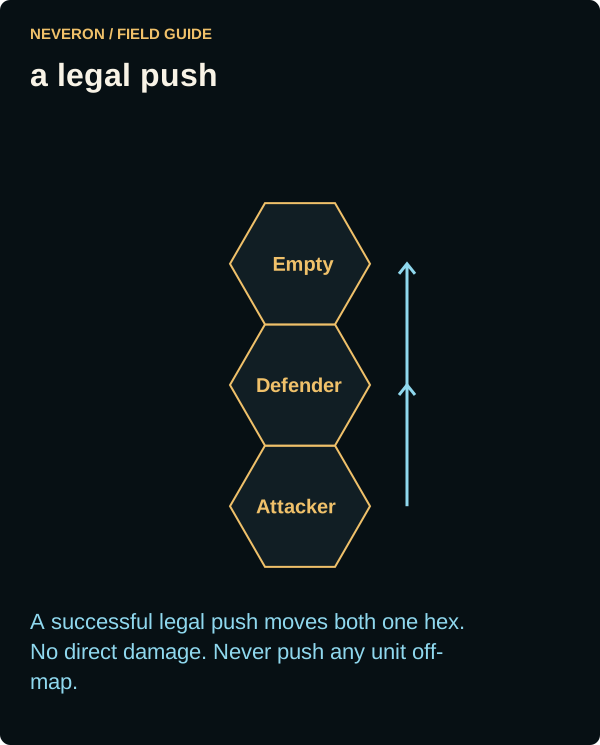
In the Fire phase, select the standing enemy directly ahead and use Push below Fire and above Punch when its physical attack preview is available. Its button shows the hit chance and stays visible while you scroll through weapons. Push commits both arms and the physical action for the turn. You may still declare legal weapons in other locations. If Push is absent, check that the target is directly ahead at the same elevation and that both arms are available. These controls require the compatible game update.
Why one mech can Push and the other cannot
Push eligibility is checked separately for each attacker. Both the Black Knight and Battleaxe can Push; their current facing can give them different available attacks against each other. Being adjacent, or seeing Punch and Kick buttons, does not guarantee a Push option.
| Biped attack | Required target direction | Facing used |
|---|---|---|
| Push | Only the single adjacent hex directly ahead. | Feet/chassis facing. Torso twist does not extend the Push arc. |
| Punch | The adjacent forward, forward-left or forward-right hex. | Torso facing, including a permitted torso twist. |
| Kick | The adjacent forward, forward-left or forward-right hex. | Feet/chassis facing. |
Example: a Black Knight faces directly toward a Battleaxe, while the Battleaxe faces slightly past the Black Knight. The Black Knight may have Push available, while the Battleaxe has only Punch and Kick because its opponent is in a forward-side hex. This illustrates facing, rather than a restriction on either design. Height, posture, equipment and previous declarations must still allow each attack.
If you want to Push next turn, finish Movement with your mech's feet facing directly toward the intended target. Twisting the torso toward it is insufficient. Both mechs must also be standing at the same elevation, and both attacking arms must be available; declaring arm-mounted weapons prevents Push that turn.
Push resolution and restrictions
- A standing mech with both arms pushes another standing mech at the same elevation directly ahead of its feet. Ordinary quads cannot push, and torso twist does not extend the push arc.
- The target cannot be executing Charge or DFA; the attacker cannot fire arm-mounted weapons that turn. Only one Charge, Push or DFA may target a mech per turn.
- Resolve after weapons in the Physical Attack Phase. Roll Piloting -1 plus applicable physical modifiers and +2 per damaged shoulder.
- A success causes no direct damage: the defender moves one hex straight away and the attacker enters the vacated hex without extra MP. The defender checks Piloting to avoid a fall.
- Use the current Charge displacement limit of one level uphill per step. Downward displacement has no height cap, but drops of two or more levels cause an automatic height-based fall for both Charge and Push.
- If displacement is blocked, neither moves, but successful-push effects including the defender's fall check still apply. If both mutual pushes succeed, neither moves and both check for falls; if only one succeeds, resolve it normally.
- Occupied destinations use displacement rules, including domino chains and accidental falls from above. Building occupancy and collapse keep the existing charge handling.
Neveron boundary rule: no unit may be pushed off-map, including through a chain. A push must not delete a unit or turn that restriction into a defeat or retreat. If any link becomes blocked, the whole push leaves units in place; a successful blocked push still requires the defender's fall check.
| Push outcome | Action consumption |
|---|---|
| Invalid when submitted | Rejected; nothing consumed. |
| Accepted, then attacker or target becomes ineligible | Cancelled without an attack roll. The physical opportunity is consumed and the arm-fire restriction remains; no retargeting or refund. |
| Miss | Action consumed; neither unit moves. |
| Success with prohibited displacement | Action consumed; neither moves. Resolve the required fall check. |
| Duplicate submission or reconnect retry | Return the recorded outcome; no additional consumption or rolls. |
Non-building terrain destruction
Inspect a woods hex during the Fire phase, choose Clear Woods, select available weapons and confirm. The list shows each weapon's hit chance, with projected heat below the weapons. Clearing uses normal ammunition and weapon heat even when it misses, and may accidentally start a fire before its attack roll. Existing building combat stays as described above. Destruction targets a terrain element; ordinary shots at an occupant do not also remove its woods. Applicable area effects can damage terrain without a separate terrain declaration.
| Terrain | Rule |
|---|---|
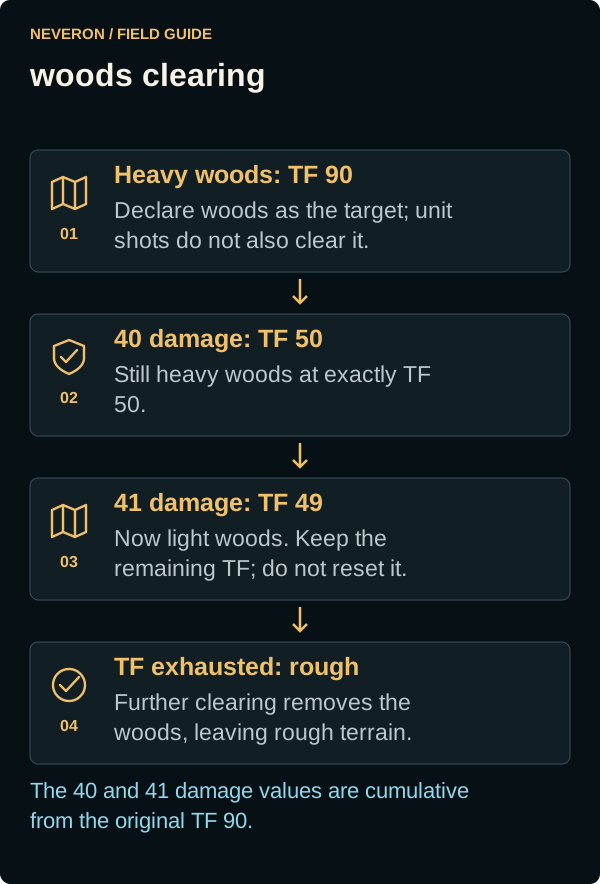
| Heavy woods | Start at Terrain Factor (TF) 90. Convert to light woods below TF 50. Exactly 40 damage leaves heavy woods at 50; 41 leaves light woods at 49. |
| Light woods | Start at TF 50. Exhausted TF becomes rough. Conversion from heavy woods retains the remaining TF instead of resetting it. |
| Terrain attack | Immobile -4 modifier; full cluster damage; double area-effect damage except against Clear/Rough ground. LOS treats the element as a standing mech; partial cover prevents the attempt. Terrain-specific unit exclusions still apply. |
Remaining TF belongs to each terrain element. Roads, snow and undefined terrain types are excluded from this release. Existing building rules and other terrain behavior remain unchanged. Clearing woods leaves rough ground; further ground deformation and automatic terrain damage from ordinary movement are outside this scope.
Fire, smoke and calm wind
Only woods can ignite under these terrain rules. Smoke can cover bare ground and remain after the woods burn out; smoke alone does not make a hex burn. Inspect the hex to distinguish Fire from Smoke. The updated inspection explicitly shows Not burning for smoke-only ground and awaits the compatible client update.
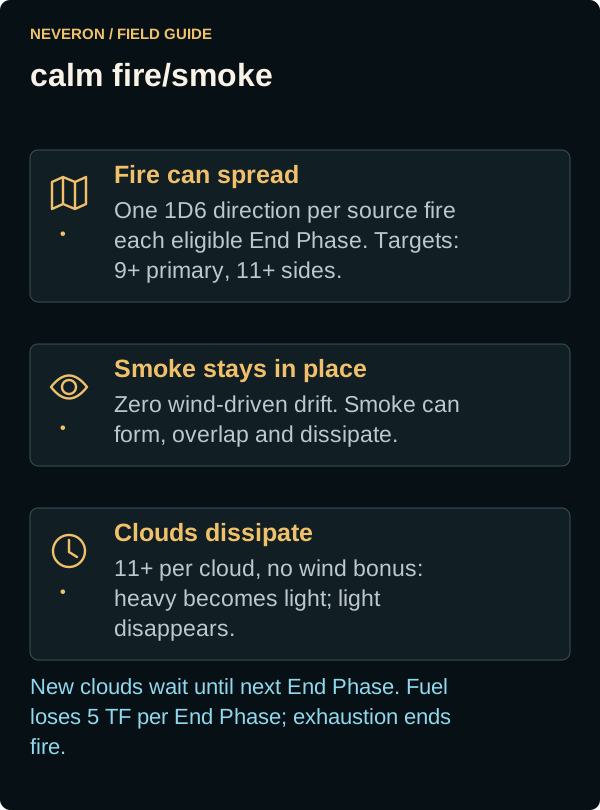
Inspect woods, choose Ignite Terrain from the dropdown beside the hex title, select eligible weapons and confirm. Inspecting woods keeps your existing targeting selections. Returning to a woods hex restores its checked weapons and action choice; checking a weapon for a new target reassigns that weapon. Use Fire, Clear Woods or Ignite Terrain to submit all selected weapons for your current unit, including weapons assigned to other units or woods hexes. Each weapon keeps its assigned target and each woods hex keeps its clear/ignite choice, regardless of which popup was opened last. The Fire count includes woods selections. If an order is rejected or the connection is interrupted, review and confirm the remaining unaccepted selections again. Weapon rows use the same layout as unit firing: mounting location, hit chance, ammunition details, assigned target and available Dump controls. Unavailable weapons show their reason in red. The small ignition percentage beside each weapon is the chance after a hit. Heat and the action button stay below the scrolling weapon list. The percentage beside the hex number shows remaining health against its original woods TF or building CF. Projected Heat After Sinks includes current/movement heat, selected and previously declared weapons, and cooling, just as when firing at a unit. A legal attack must hit before its separate ignition roll. Fire and smoke markers update when the battle server resolves them. Clearing and deliberate ignition checks report their result and dice roll in the battle log; a failed check reports that no fire started. The combat-log update removes standalone fire-start, already-burning and per-hex terrain-damage messages so combat results stay readable. Check the map markers and inspect the hex for fire, smoke and remaining woods health; attack results and damage to units remain in the log. This requires the updated client and Battle Server. Wind is fixed at Calm. Calm still allows fire spread; it gives smoke zero wind-driven drift. Other wind types are retained below for future support.
| Weapon | Base ignition result on 2D6 |
|---|---|
| Flamer | 4+ |
| Direct-fire energy/pulse | 7+ |
| Missile/direct-fire ballistic | 9+ |
Existing Small Laser and ER Small Laser cannot deliberately ignite terrain under the listed energy category. Gauss rifles, SRM-2s and conventional SRM infantry are excluded from the ballistic/missile category. Ordinary infantry weapons cannot ignite terrain; the existing infantry Flamer is an exception. Only existing weapons are included in this release. Clearing can cause accidental ignition at 2D6 of 5 or less, and ignition checks after eligible misses into woods: 2D6 of 3 or less allows a separate ignition roll with +2 added to its target number. Normal fires have no universal burnout timer; losing their fuel can extinguish them.
These are ignition results after a successful legal attack. Small Pulse Laser uses the pulse row. For terrain attacks, Streak SRMs use the same rules as ordinary SRMs of the same size: SRM-2 and Streak SRM-2 (including the one-shot version) cannot deliberately ignite terrain; SRM-4/6 and Streak SRM-4/6 use 9+. Terrain attack eligibility, clearing, heat and ammunition consumption follow ordinary SRM handling. AMS and ordinary beacon launchers do not gain a terrain-ignition action. Additional weapons and special ammunition are outside this release.
BattleMechs gain +5 heat in each Heat Phase while occupying burning ground, including newly ignited fire. Ordinary terrain fire does not damage their armour. Ground movement adds +2 heat for each burning hex left, including the starting hex; standing still adds no departure heat. Jumping does not add ground-traversal heat.
Combat vehicles and conventional infantry roll 2D6 each time they enter burning ground and again at the end of the Movement Phase if they remain there. Entering and stopping there requires both rolls. On 8+ there is no effect. On 7 or less, conventional infantry lose the entire unit; vehicles instead roll a separate 2D6 − 2 on the Front/Rear vehicle critical column. Forward entry uses Front and reverse entry uses Rear; the ending check retains that movement direction (Front for a stationary unit). Fire-resistant armour retains its exemption. Mounted passengers avoid separate ground-exposure rolls while carried; carrier destruction still uses transport survival rules. Building behavior remains unchanged.
Neveron selects 5 TF damage per turn in the End Phase, rather than the optional 2 TF. Exhausted ordinary vegetation becomes rough and its fire extinguishes in that same End Phase. Heavy-to-light conversion retains remaining TF. Forty qualifying area-effect damage to the hex in one phase extinguishes its fire; the same attack can still damage woods.
| Wind | Spread: primary / 60° either side | Smoke drift per turn | Dissipation bonus | Scope |
|---|---|---|---|---|
| Calm | 9+ / 11+; random direction | 0 hexes | +0 | Current fixed wind |
| Light Gale | 7+ / 10+ | 1 hex | +0 | Future reference |
| Moderate Gale | 7+ / 10+ | 1 hex | +1 | Future reference |
| Strong Gale | 6+ / 9+ | 2 hexes | +3 | Future reference |
| Storm | 6+ / 9+ | 3 hexes | +5 | Future reference |
Spread first checks in the End Phase of the turn following ignition. For Calm, select one direction with 1D6 for each source fire in each eligible End Phase; that source uses the direction for all its spread attempts. Newly spread fires wait until the following End Phase to spread.
- Drift existing smoke.
- Check existing-cloud dissipation.
- Check eligible fire spread.
- Generate smoke, including from newly spread fires.
- Check applicable weather extinguishing.
New smoke first drifts and checks dissipation in the following End Phase. Smoke generally rises two levels; light/heavy smoke affects LOS like light/heavy woods. Overlapping light clouds count as heavy locally, while each cloud keeps its identity and independent dissipation history. Each eligible cloud checks at 11+ with its wind bonus: heavy becomes light, light disappears. The selected fuel-damage pass follows this sequence, with exhaustion extinguishing fire before that End Phase completes.
Remaining unsupported equipment and environmental exceptions stay unavailable until verified. Future changing weather and wind selection are outside this initial scope. The battle's authoritative phase progression resolves spread, heat and smoke once; reconnecting or leaving a tab open will not independently advance them.
Combat icons
Unit silhouettes identify the chassis in the map marker and unit details. Infantry-support tanks, including the Ignis SRM variant, use tank silhouettes; infantry squads use their movement and weapon icons. The Ignis icon correction awaits the next client update.
Action labels stay visible beside their icons. Map markers use different shapes for fire, light smoke, heavy smoke and damaged woods; inspect the hex for its text status and remaining TF.
| Icon | Meaning | Use |
|---|---|---|
 | Push | Separate physical attack; commits both arms. |
 | Blocked Push | The battle log reports a successful push with prohibited displacement. |
 | Clear Woods | Weapon attacks against the woods, rather than an occupant. |
 | Ignite Terrain | Deliberate ignition declaration. |
 | Fire | Burning terrain; movement and occupied-fire effects apply. |
 | Light smoke | Effective light smoke in the hex. |
 | Heavy smoke | Heavy smoke, including overlapping light clouds. |
 | Damaged woods | Remaining Terrain Factor is shown in inspected details. |
When an action is unavailable
- Check the current phase, deadline and whether you control the unit.
- Inspect posture, pilot consciousness, shutdown, destroyed components, ammunition and heat.
- Check range, mounting arc, torso-twist compatibility, LOS and the target's actual terrain/height.
- Check whether an earlier declaration already committed the weapon or limb, or whether movement/standing used the required budget.
- Read the server's rejection and battle log. A planned rule in this article does not add a control to the current game.