Arena
Sensors and jammers
Understand detection range, jammer coverage and unknown contacts.
Reviewed
Unit electronics depend on the arena settings. Check the published unit profile and match visibility rules; the worked numbers are illustrative.
A player’s guide to finding enemies, protecting your force, and understanding fog of war in Neveron: The Resurgence®.
The essentials
Sensors determine whether a unit can electronically detect an enemy. Jammers make friendly units harder for enemy sensors to detect. A unit’s detection signature describes how easy that unit is to pick up: a lower number is better for concealment.
Visual sight is separate. Clear or partial line of sight still reveals an enemy even when its jamming defeats your sensors. A sensor contact alone does not grant permission to fire.
When these rules apply
Unit electronics are an arena option and default to off. Betting arena creation offers Battlefield visibility: choosing Fog of war enables sensors and jamming. Existing arenas without enabled electronics use their configured arena sensor behavior. The arena’s rules and range multiplier are fixed when it is created.
Read the five electronics stats
| Stat | What it tells you |
|---|---|
| Detection signature | How easy the target is to detect. Higher = easier. |
| Sensor range | Nominal reach, before signature and jamming. |
| Sensor strength | Detection power; helps find small signatures and resist jamming. |
| Jamming range | How far the jammer protects units of its own empire. |
| Jamming strength | How much it compresses an opposing scanner’s reach. |
The default range multiplier is 5: a stored range of 6 becomes a nominal radius of 30 tactical hexes. Apply the multiplier only to ranges, never to strength or signature. If the popup already labels a range in hexes, do not multiply it again.
Scope: based on local Neveron implementation and design sources inspected on 17 September 2026. Live deployment and individual unit catalog values were not checked. All numerical combat examples below are illustrative.
1 / How detection range works
Nominal range is an upper limit. A small signature can reduce it, and a covering hostile jammer can reduce it further. Stronger sensors improve both sensitivity and resistance to jamming.
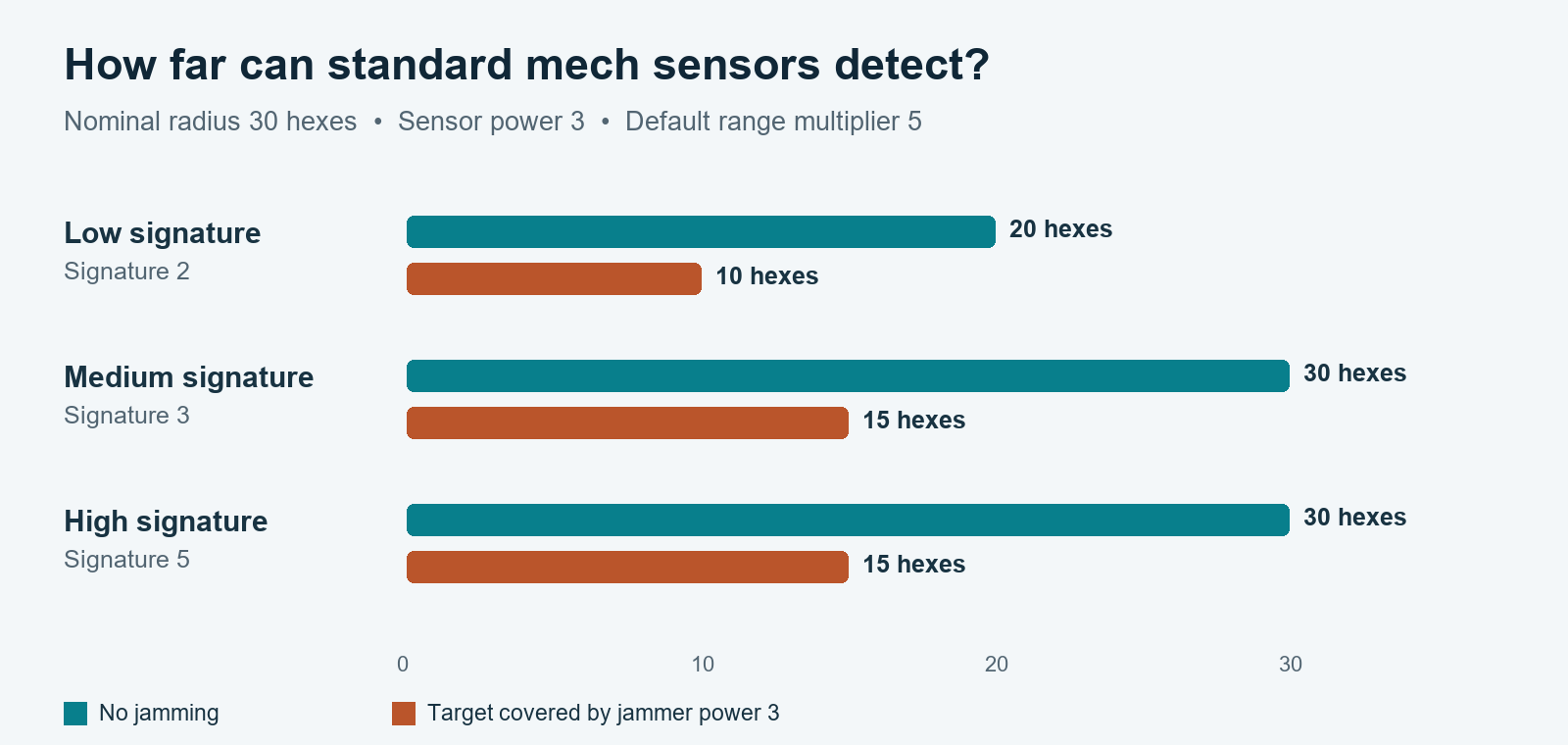
Figure 1. The same scanner has a different effective range for different targets. A larger signature does not extend detection beyond the nominal radius.
A worked example
Your scanner has stored range 6 and sensor strength 3. At the default multiplier, its nominal radius is 30 hexes. Against a signature-2 target, sensitivity is 2/3, so unjammed detection reaches 20 hexes. If that target is protected by jammer strength 3, equal opposing power halves coverage; the detection limit becomes 10 hexes.
At exactly 10 hexes the jammed target is detected. At 11 it is not, unless visual sight or another friendly observer reveals it. The check is deterministic: there is no extra detection roll.
The calculation
Detection limit = R × P ÷ (P + J) × min(1, P × S ÷ 9)
R = nominal sensor radius in hexes; P = scanner strength; S = target signature; J = strongest eligible jammer covering that target, or 0.
Detect when the hex distance is at or below the limit. Keep fractions during calculation: a limit of 13.33 reaches distance 13, not 14. A unit with zero sensor range or zero sensor strength cannot generate a sensor contact, even in the same hex.
2 / How jammer coverage works
A jammer protects itself and friendly targets inside its radius. Coverage uses hex distance, includes the boundary, and applies full power everywhere inside. There is no gradual falloff or terrain shadow in the jamming calculation.
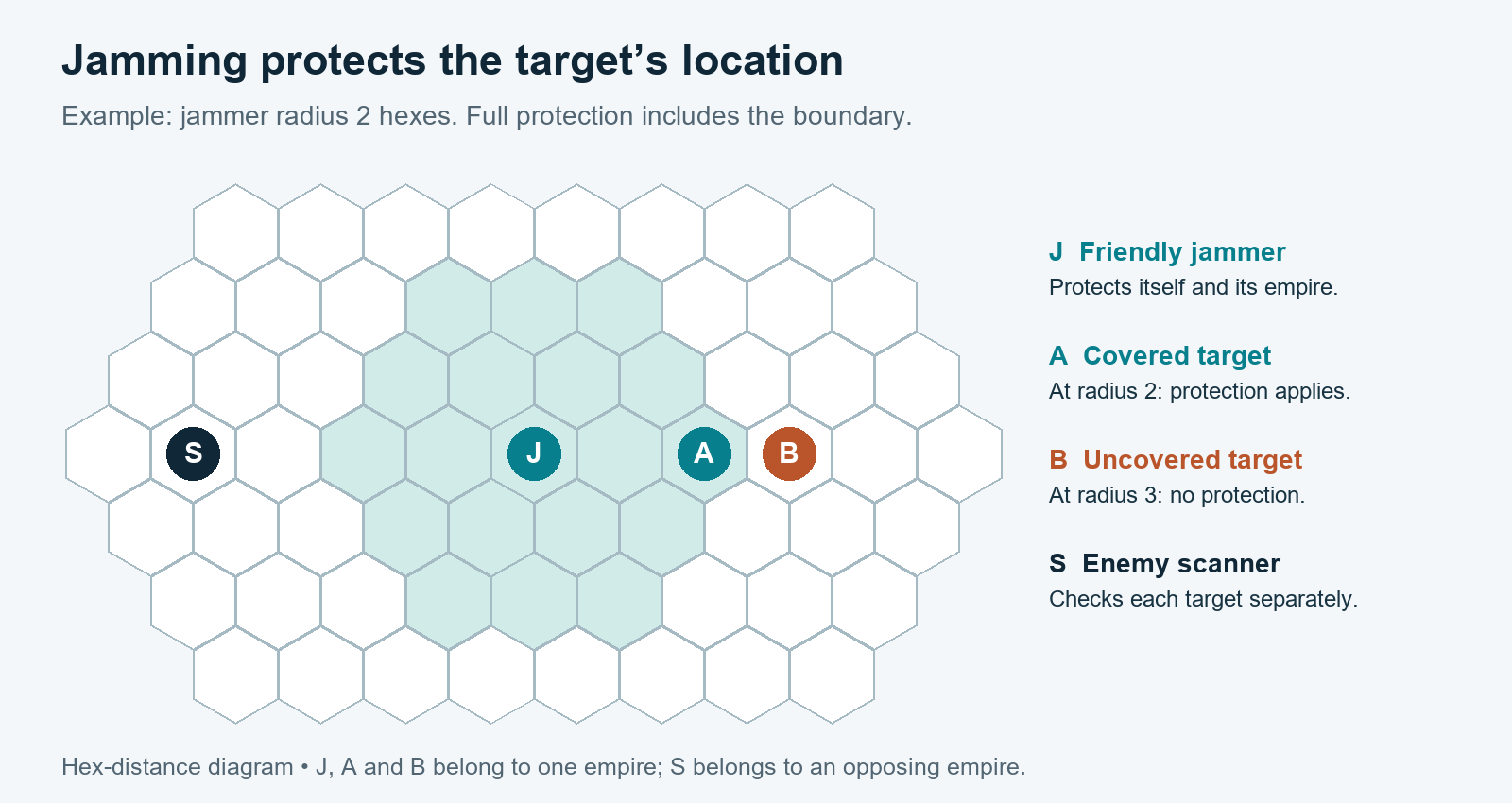
Figure 2. A small illustrative radius makes the boundary visible. The scanner does not have to be inside the jammer’s field for the protected target to benefit.
Ownership and overlapping fields
- Friendly means the same owner empire. Owner-, delegate-, and AI-controlled units of that empire share protection. The same player controlling a different empire does not make it friendly.
- Friendly jammers do not interfere with their own empire’s scanners. Unrelated generated AI sides remain separate.
- Only the strongest covering jammer counts. Strengths 3 and 4 together count as 4, not 7. Additional jammers can still extend coverage or provide redundancy.
Movement and equipment state matter
Leaving coverage removes that jammer’s protection immediately. A target can become detectable even while moving farther from the scanner, because it crossed the jammer boundary. Moving, destroying, shutting down, or transporting the jammer can also change contact without the target moving.
Scanners and jammers must be operational and not shut down. Spending movement or weapon actions does not consume their electronics capability. A shut-down target keeps its normal signature; shutdown does not make it invisible.
3 / What fog of war shows
Fog of war presents the observing empire’s knowledge. Any eligible observer with visual sight can reveal the enemy; otherwise, a successful sensor check can create an unknown contact. Each scanner checks independently: several failed scans do not add together into a successful one.

Figure 3. The in-game unknown sensor-contact artwork. The battle interface also retains the contact’s existing weight-class colour.
| Enemy state | What you see |
|---|---|
| Visual contact | An identified enemy marker, with information permitted by visual observation. |
| Sensor contact only | An Unknown unit marker. Its identity is hidden; the weight-class colour remains. |
| Undetected | No current enemy marker or current unit details. |
Contact can change
An identified enemy can downgrade to an unknown contact when visual sight is lost but sensors still detect it. Losing both sight and sensor detection removes the live contact. Do not treat an earlier sighting as a live position report.
Players use their own side’s view. Spectators choose an empire viewpoint and see that empire’s current knowledge. Seeing a contact through your side’s shared knowledge does not mean every unit can shoot it.
Detection is not a firing solution
Weapons still use their own range, line-of-sight, and attack rules. Indirect fire requires a valid friendly spotter with clear or partial sight and an eligible weapon. A launcher need not have its own sensor contact when a valid spotter supplies the solution. Jamming does not block visual sight or automatically cancel an otherwise legal attack.
4 / Put the rules to work
- Check the unit popup before choosing a scout or escort. A chassis name is not proof of a sensor bonus or installed jammer.
- Use smaller-signature units when reducing enemy sensor reach matters. Better electronics does not itself increase the carrier’s size-based signature.
- Keep protected units within escort range. Position multiple jammers to cover more of the force rather than expecting their strengths to stack.
- Move an observer closer or use stronger sensors to find difficult contacts. Preserve visual spotters when planning indirect fire.
- Check the arena visibility mode first. Unit electronics and fog of war are separate settings; the Betting Fog of war option enables both together.
Size-based signatures
| Signature | Mech weight | Vehicle weight |
|---|---|---|
| 1 | — | Over 0 to 10 tons |
| 2 | Over 0 to 35 tons | Over 10 to 25 tons |
| 3 | Over 35 to 55 tons | Over 25 to 50 tons |
| 4 | Over 55 to 75 tons | Over 50 to 75 tons |
| 5 | Over 75 tons | Over 75 tons |
The implementation’s baseline mech sensors are range 6 / strength 3; vehicles are range 5 / strength 2. Explicit unit profiles can differ. “Jamming: None” means the unit has no active jammer capability in its published profile. Infantry uses separate profiles and may have zero sensors or fractional jammer ranges.