Arena
Monthly arena tournaments
Enter a division, submit availability and compete through the bracket.
Reviewed
Administrator rematch availability reopening requires the new client and strategic update; prepared locally, rollout pending. Short-overlap scheduling, either-player conflict reporting, explicit conflict consequences and separate division/series prize labels require the new client and strategic update; prepared locally. Tournament name-reference rename/delete correction requires the strategic identity update and ordered migration 95; prepared locally. Automatic check-in-based no-show wins at arena-window close and reliable checkout reentry require compatible client, strategic and Battle Server publication; prepared locally. Ticket-conflict ban prevention and same-account spectator handoff require compatible client and Battle Server updates; rollout is pending. The server correction that restores early readiness, checkout and scheduled starting for loaded fighter rosters requires the updated tournament server. The correction that keeps waiting-arena checkout controls and the header current after player presence changes requires the updated client; publication is pending. The first tournament story and final division standings in World History require the compatible client and server update. Early-start consent, reversible checkout, fallback-time acceptance/conflict reporting, admin rescheduling and the header countdown require the compatible client and tournament server release. Recorded results show winner/loser without a loser concession. These changes are implemented locally; coordinated rollout is pending. Tournament disconnect lock release and requester-only arena resume notifications require compatible strategic and Battle Server updates. Division-wide cancellation prevention and automatic BV/unit-count adjudication require the compatible tournament server/client release. The rematch attendance and active-battle no-show correction requires the updated tournament server. The Concede Match and Request No-Show Review correction requires the updated client and tournament server. The finished-match check-in correction awaits the updated client and tournament server. Scheduled tournaments and weekly defaults are available in the current release. Preselected match dates, separate time entry and dialog-local window validation require the updated client. Early Join Battle requires the compatible client and tournament server update; it appears only when the match permits it. The enrolled-series selection correction requires the updated client. The account-casing fighter-entry correction requires compatible strategic and Battle Server updates. Phase ordering during entry/reconnect requires the updated client. Timeout-completion recovery requires updated tournament servers; primary draws retain result review before the conditional rematch. The 50/50 scheduling/skill pool policy and private schedule summaries await the compatible tournament update and future-event enablement; published legacy events keep their policy. The 90-minute match extension awaits compatible tournament servers and event configuration; already opened battles keep their original limit. Full 24-hour battle-day scheduling, agreement from shared match periods and automatic closest-fit assignment from saved weekly defaults require the corrected client/tournament server update; opened stages and existing battles retain their published dates. The UTC tournament timestamp correction is verified in the current strategic server; event-date daylight-saving conversion and matching card/countdown times pass focused checks. Other tournament updates retain their separate publication gates.
A player's guide to entering, scheduling and competing
Edition: 14 October 2026
Your next Arena challenge
Two players. Identical four-mech lances. A second chance after your first loss. Monthly tournaments bring scheduled Arena battles, skill-based divisions and prizes to Neveron.

The essentials
-
Entry is free. Enter one empire you own, with one entry per account in each monthly series.
-
Both players receive the same temporary four-mech lance and fresh Gunnery 3 / Piloting 3 pilots for each battle. Your permanent units stay safe.
-
The normal format is double elimination: your first loss sends you to the losers bracket; your second eliminates you.
-
The top three in each division receive in-game cash. The champion may also receive the advertised permanent unit prize.
Your first five steps
Open Arenas → Tournaments. Read the loadout and prizes. Register your empire. Check My Tournament when the roster locks. Save your match availability before its deadline.
With the tournament selection update, opening Tournaments prefers your enrolled ongoing series over a future series. My Tournament returns to your enrolled ongoing series even after you view another event. If you have entered both the ongoing event and next month's registration, your ongoing event takes priority.
Use a desktop, laptop or landscape tablet. Arena setup and combat require a larger screen; phone-sized screens are blocked.
Choose your empire
Start in Arenas → Tournaments. The Enrollments view shows registered empires during registration, then seeds, ratings and competition status after the roster locks. You can enter once a public series has been published and registration is open.
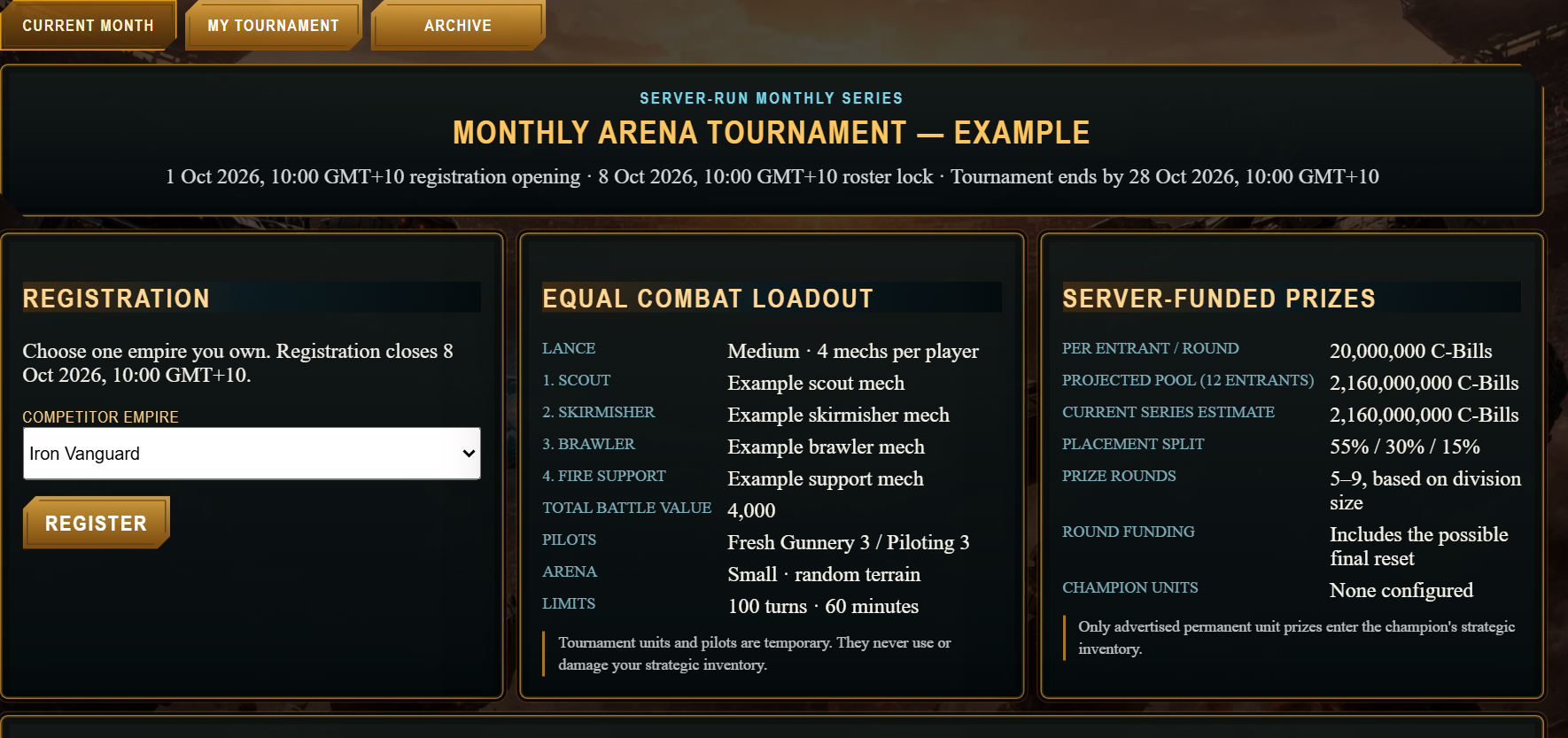
Registration opens on the 1st
The monthly schedule opens registration at 00:00 UTC on the 1st and closes it seven days later, at 00:00 UTC on the 8th. The game displays dates and match times in your browser's local timezone. Use those displayed times when setting reminders.
Daylight-saving changes are applied for the date of each match. Your saved weekly availability uses its chosen timezone; match cards and round-specific date entry use your browser's timezone. These can differ. Check the timezone shown beside a match time, and use a named region such as Australia/Sydney for weekly defaults when your location changes clocks.
The compatible tournament server correction keeps these displayed times accurate even when the server uses a different local timezone. Unplayed future battle days can also be extended to the full day when other bracket positions are automatic byes; played matches and recorded outcomes retain their dates. Until the update is installed, an older card may still show a short window. Check the current published window before submitting availability.
Register an empire you own
Choose your Competitor empire and select Register. Before registration closes, Withdraw Registration lets you leave and register a different owned empire. Once the roster locks, your chosen empire is fixed. Delegated access to someone else's empire is not enough.
Know your supplied lance
Read Equal Combat Loadout for the month's four mech designs, roles and total Battle Value (BV). You do not bring your own military units. New battles provide fresh equipment and pilots. Current standard battles use a small arena, random terrain, a 100-turn limit and a 60-minute limit; check the published loadout for your event.
Find your division
At roster lock, the server groups entrants into divisions of 4–16 using tournament skill ratings. Larger fields create several divisions. Each division has its own bracket and prizes. If fewer than four eligible players remain, the monthly series is cancelled.
Pools that consider when you can play
Future enabled events show a policy of 50% scheduling compatibility and 50% skill. Save Default Availability before registration closes: when both entrants have declared times, grouping compares usable overlap during the event's fight windows. If either lacks times, it compares their time zones. An unknown zone receives a neutral scheduling score. Empty availability does not mean all-day availability.
Pool sizes, prizes, skill ratings and bracket rules stay the same. Grouping improves compatibility but cannot promise a shared time with every opponent; the normal match scheduler still assigns the battle time. Events already published under the earlier policy keep that policy.
After lock, Enrollments shows your pool members' frozen weekly times in their named time zones. Open Event times in your zone and UTC for dated local-time and UTC intervals. Overnight periods are labelled, and event dates account for daylight-saving changes. Exact schedules are visible to their owner, members of that pool and administrators; other pools show Private / unavailable. Later changes to your saved defaults affect future events, not a locked pool.
This pool policy requires the compatible tournament update and future-event enablement.
Save availability early
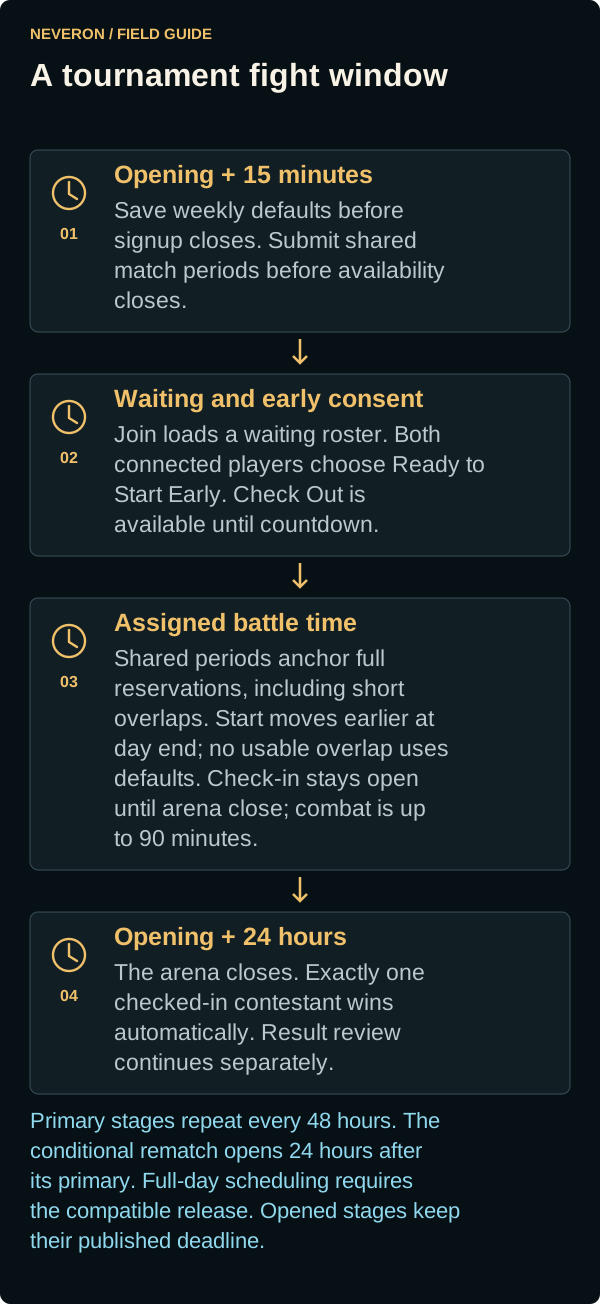
A stage is a scheduled step in the bracket. Stages begin every 48 hours; a conditional rematch opens 24 hours after the primary opens. With the corrected scheduling rules, each battle day spans 24 hours so evening availability can be used. Primary and conditional-rematch times are chosen separately. Opened stages and existing battles keep their published dates. Check the window shown on your match; full-day scheduling requires the compatible tournament update.
Use the Availability button on your match
-
Open My Tournament and select Availability when the button becomes available.
-
For Primary battle day, add periods when you can stay for the whole match, then select Save Availability. With the updated editor, the dates are preselected for the match window. Enter Available from time and Available until time in your local timezone, within the opening and closing times shown. Shared periods take priority. If they fit the whole reservation, the server chooses the earliest fitting start. With the overlap update, a shorter shared period still anchors the full reservation; it can extend outside submitted availability, and the start moves earlier if needed to finish before arena close. Without a usable overlap, the server chooses the closest fit to both saved weekly defaults. Each merged period must meet the minimum duration shown for your tournament. Times outside the window or periods that are too short show an explanation inside the editor so you can correct them before saving.
-
Open Availability again, choose Conditional rematch day, and save periods for that day too. Changing the window selects its match date and loads its saved periods. For a period after midnight, select the following date for its end. Each window is saved separately. Leave both time fields blank to keep weekly defaults; clearing all times and saving restores those defaults. Add Period selects the same match dates for another option.
-
Save weekly defaults before registration closes. With the updated timing rules, submit any round overrides before availability closes, 15 minutes after the primary window opens. The server then publishes assignments with at least one hour of notice.
Use the Assigned or Agreed date and time on your match card as the appointment. The arena window can open earlier while availability is collected and the required notice passes.
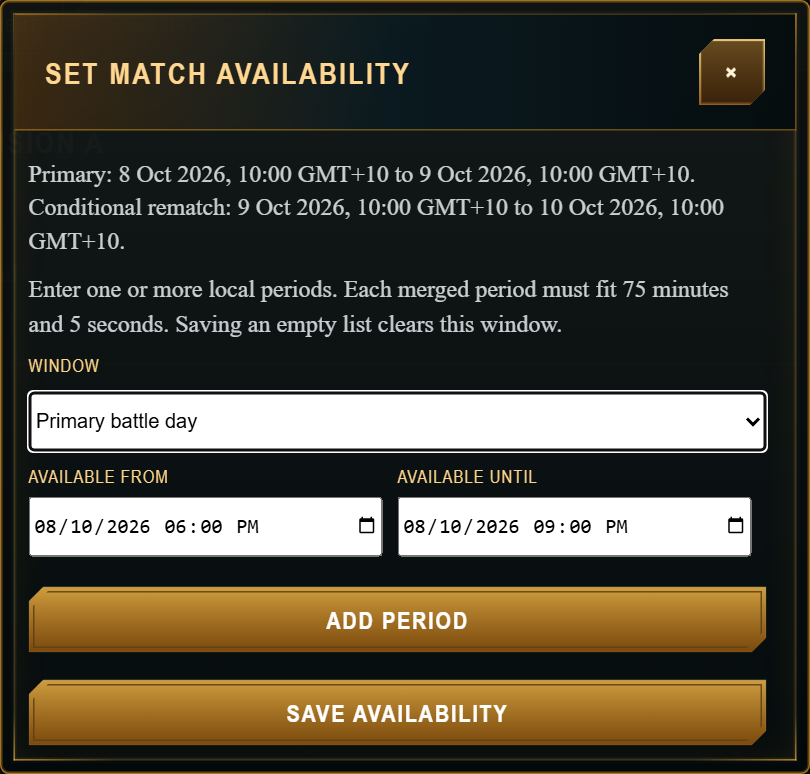
With the match-time extension, new tournament battles allow up to 90 minutes. Each merged availability period must fit at least 105 minutes and 5 seconds; use 106 minutes or longer for weekly defaults. A two-hour block is an easy practical choice. Battles that have already opened keep their original time limit. Check the Limits shown for your event. The extension requires the updated tournament servers. Offer several genuine options where possible. Empty availability clears that window; it does not mean you are available all day.
The server chooses the assigned time. Availability is a preference, not a guaranteed booking. If no shared period fits the full match, a fallback assignment can be outside your saved availability. Check your match card after scheduling; the warning states the distance from your availability, and an absence is routed to administrator review.
Be ready to enter
Use My Tournament for your entry, losses and match cards. You can join and wait during the current fight window or enter at the Assigned time.
Join during the fight window
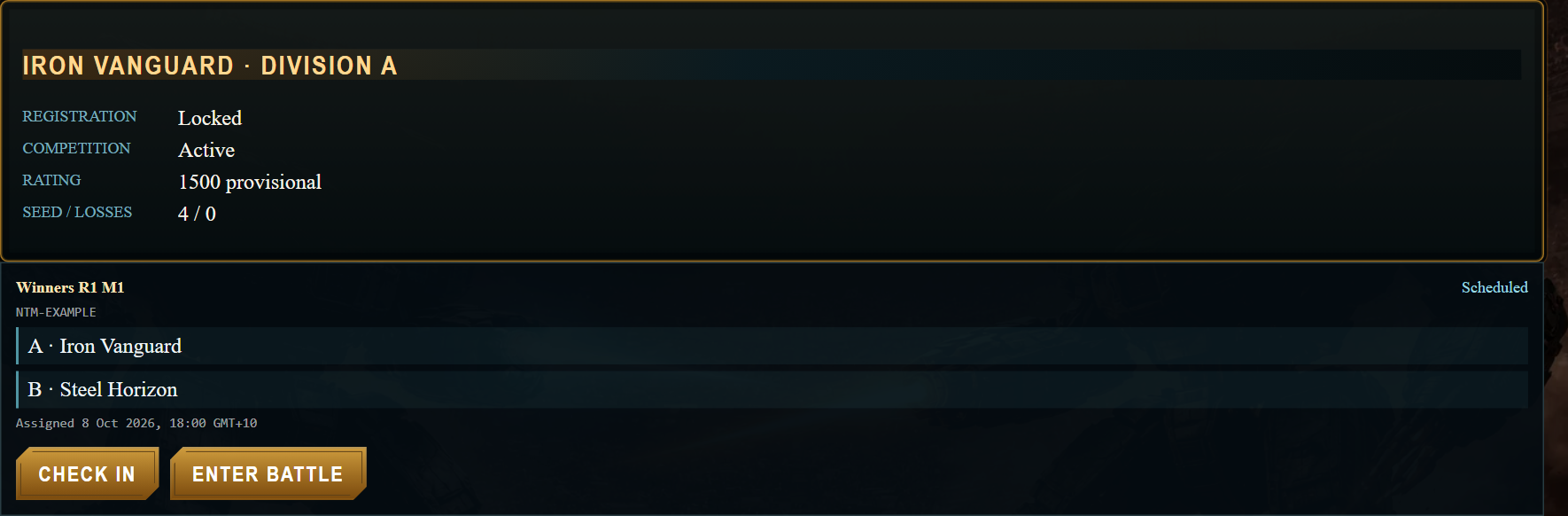
When Join Battle is available on your match card, choose it to enter the arena and wait for your opponent. You can join during the current primary or conditional-rematch fight window, including while availability is still collecting. Keep your registered empire active and leave other battles or spectator sessions.
Joining early is your choice. Your opponent must choose Join Battle themselves to enter early; being online does not pull them in ahead of schedule. For a compatible or accepted assigned time, with the window-close update automatic entry remains available until the arena closes, when your registered empire is active and you are free to enter. With corrected scheduling, a shared match-specific period takes priority. With the overlap update, short shared periods also anchor the full reservation. If either player submits nothing or no shared period can anchor a legal reservation, the server assigns the closest fit to both players' frozen weekly defaults. That appointment starts at its assigned time without another mutual-acceptance step, even if defaults conflict. Older proposed appointments may still require acceptance. Before a time is assigned, entry is voluntary. The arena waits for both current players. Before the assigned time, both must explicitly select Ready to Start Early; loading a roster alone is not consent to early combat. With corrected full-day scheduling, waiting and combat end at the published battle-day close. Opened stages and existing battles keep their original deadline. There is no separate two-hour arrival deadline; joining late does not give a fresh 90 minutes. The match card identifies Primary arena closes or Rematch arena closes. A conditional rematch has its own opening and closing times. Reconnect retries follow the same timing rules.
With the window-close update, Join Battle also checks you in. If exactly one contestant is checked in when the current arena window closes, that contestant automatically receives the no-show win. Check In alone is sufficient: you do not need to load your roster or remain connected in the waiting arena. An absent opponent's availability mismatch does not block that award. The normal result review still applies; no administrator approval is needed for an undisputed win. This update requires the compatible client and tournament server release.
Join Battle requires the compatible tournament release and appears only when your match permits it. An early primary draw still uses the conditional rematch.
Your registered account should receive fighter entry even if its name is capitalized differently when signing in. The account-matching correction requires compatible tournament and Battle Server updates. If your own match offers only Spectate while your registered empire is active, report the match ID; that alone does not mean your signup failed.
Waiting, early starts and checkout
With the waiting-controls update, Join Battle lets you load your roster and wait. Select Ready to Start Early only when you agree to fight before the assigned time. Both players must agree while connected. Disconnecting clears that player's consent, and a recovered waiting arena requires fresh presence and consent. Check In alone is separate from entering the arena.
Log in with your registered empire active, leave any other battle or spectator session, and open My Tournament. Check In becomes available 15 minutes before the assigned time. Keep the game open and watch for the Arena-ready notice.
Check In applies only while your match is waiting to be played. A live battle, result under review or finished match cannot be checked in again. If a match was played early, its original Assigned time does not reopen check-in. This correction requires the updated client and tournament server.
At the assigned time
After the compatible server correction, leaving a tournament battle releases its entry lock so you can join another arena. Stay available for your assigned match: disconnecting clears current early consent and cancels a waiting countdown, but preserves attendance history and deadlines. Leaving a live match does not stop it. If a tournament battle is still connected, leave it before creating or joining another arena.
The game attempts to bring eligible online fighters into the tournament arena automatically. You must be free of another battle connection. Use Enter Battle when available and confirm that the battle has actually loaded. Checking in by itself does not record attendance; entering the battle does.
If you are running late
Arrive at the assigned time to give both players time to fight. With the window-close update, Check In and Join Battle remain available until the displayed Arena closes time. The waiting arena stays open through that deadline; an earlier grace or review deadline does not award the no-show win. Both players checked in means a one-sided no-show win does not apply. Check-in for a primary battle does not carry into its rematch.
Both contestants should see the same active phase. The client update corrects a phase-ordering problem during entry and reconnect. If phases disagree, refresh and check the phase and battle log before issuing another order.
Check Out without conceding
Check Out leaves the waiting arena, clears your check-in and early consent, and stops automatic re-entry until you select Join Battle or Check In again. It does not concede, withdraw your tournament entry or move the attendance deadline. It closes when countdown begins. A disconnect during a waiting countdown cancels that countdown; returning before the assigned time requires fresh early-start consent.
The checkout correction keeps the waiting controls and header current as players enter or leave the arena. It requires the updated client. Check Out remains unavailable once countdown begins.
A separate server correction allows Ready to Start Early and Check Out to recognize your loaded tournament roster. It requires the updated tournament server. After Ready to Start Early succeeds, the waiting message confirms your readiness; the five-second countdown begins when both connected players have agreed. If the message remains unchanged after both players press it, report the match ID.
The same server correction also restores scheduled starting. At or after your Assigned time, both connected fighters can start without selecting Ready to Start Early. If only one roster is currently connected, the arena waits for the other fighter to return; the attendance deadline remains unchanged.
A proposed time you cannot attend
With the overlap update, shared match-specific periods take priority over weekly defaults. A full-match overlap produces an Agreed time. A shorter overlap produces Assigned from shared availability: the reservation starts at the shared time, or moves earlier when needed to finish before arena close. The card shows the shared period and Full reservation ends. This keeps the full 90-minute combat allowance plus attendance grace and countdown; it may extend outside one player's submitted availability. No usable overlap means the server uses both saved weekly defaults to minimize the worse mismatch, then total mismatch, then the earliest start. Minimum notice and the fixed window still apply. Existing published appointments retain their times.
With the conflict-control update, either opponent can select Cannot Attend This Time after scheduling, even if the assigned time fits their saved availability. It reports the conflict, clears that player's check-in and disables automatic entry. It does not reschedule the match or guarantee an exemption. A sole checked-in opponent receives the no-show win at arena close, subject to normal result review. If you can attend after reporting, select Accept Assigned Time, then Check In or Join Battle. Older Proposed time (acceptance needed) appointments keep their acceptance requirement. Administrators can reschedule an unplayed match inside its fixed window with full reservation and minimum notice.
The distance warning measures how far this start is from a start that fits the whole reservation, including attendance grace and countdown. For a 90-minute battle this is normally 105 minutes 5 seconds. It does not just count minutes past your availability end. The card shows your effective availability and the review decision deadline. Reporting a conflict does not guarantee an exemption. With the window-close update, an opponent who checked in receives the automatic no-show win at arena close if you did not check in. Unresolved combat retains fixed expiry and its result rules.
Administrator rescheduling
With the rematch rescheduling update, an administrator can select Reschedule Match for an unplayed primary match under review and enter a reason. This moves it into the fixed rematch window and reopens Availability for both contestants. Open My Tournament, select Availability and submit times for the rematch before the deadline shown on the card. Existing saved rematch periods can be reviewed or replaced. Collection normally closes two hours after the rematch window opens, or two hours after the administrator reopens it if the window is already open; a short remaining window can reduce this period. The server then assigns a time from shared periods or saved weekly defaults. Both contestants must check in again for the rematch. The arena closing time stays fixed. Played matches and an already used rematch cannot use this control. Direct administrator appointment editing is labelled Assign New Time. This workflow requires the compatible client and tournament server update.
Match timers in the header
The empire header shows your next applicable real-world match deadline only within two hours. It covers availability, check-in, assigned start, arena close, combat expiry, result review and an activated rematch. Select the timer to open My Tournament. At zero, Awaiting match update means the next authoritative state has not arrived. Conditional rematches are not shown as confirmed appointments. The game-calendar date elsewhere in the header is a separate clock.
These waiting, scheduling and header controls require the compatible tournament release. They are documented from the local implementation; their presence in your game depends on rollout.
After the battle
A decisive battle records the winner and loser automatically. The losing player does not need to select Concede Match, accept the result or confirm the loss. Result Pending means the recorded outcome is in review. With the result-card correction, the card shows Provisional winner and Loser (or Provisional draw) and hides Concede Match during review. Use Dispute Result if the outcome is wrong. This display correction requires the updated client and tournament server.
Within a battle, Already declared applies only to the current round. Weapons and physical attacks must be declared again in later rounds when legal. The client correction for declarations appearing in a later round requires the updated client.
Return to My Tournament and check the result and next match. Results normally have a 60-minute review period before becoming final. Only final results advance the bracket. Save fresh availability for the next stage when its controls open.
With the match timing display update, match cards show the Conditional rematch time and Result review closes deadline in your local timezone. An administrator’s Void Primary / Rematch decision starts a new 60-minute review; the match remains Result Pending until that decision becomes final. An open dispute requires administrator resolution. Uphold Result keeps the original outcome and review deadline.
A battle that reaches its active-combat time limit or the fight-window expiry without a winner is a draw. Result review continues after the arena closes. After its 60-minute review period, an undisputed primary draw activates the conditional rematch at its assigned time. A rematch without a winner goes to administrator review.
If a finished battle still shows Ready, report the match ID. The completion-delivery correction requires the updated tournament servers. The no-show deadline applies to attendance; it does not extend a finished battle or replace result review.
Your rematch records attendance separately from the primary battle. With the tournament server correction, a running battle cannot be cancelled as a no-show because an entry record is delayed. If both players receive Invalid battle and refresh offers no Enter Battle control, report the match ID so an administrator can review the interruption. Refreshing alone does not reopen a stopped match.
Keep both days available if you can. A drawn primary battle can activate the conditional rematch. If the rematch has no normal winner, administrators review the result.
Administrator dispute review
With the dispute reason display update, administrators can open Current Month, choose a Division and select Schedule to review disputed match cards. Each open complaint shows the submitting empire, submission time and Reason above Uphold Result, Correct Winner and, for primary battles, Void Primary / Rematch. Complaint reasons are visible only to administrators. Resolving the dispute removes it from the open complaints display.
One loss is not the end
Everyone starts in the winners bracket. Winning keeps you moving forward. Your first loss moves you to the losers bracket, where you can still reach the championship.
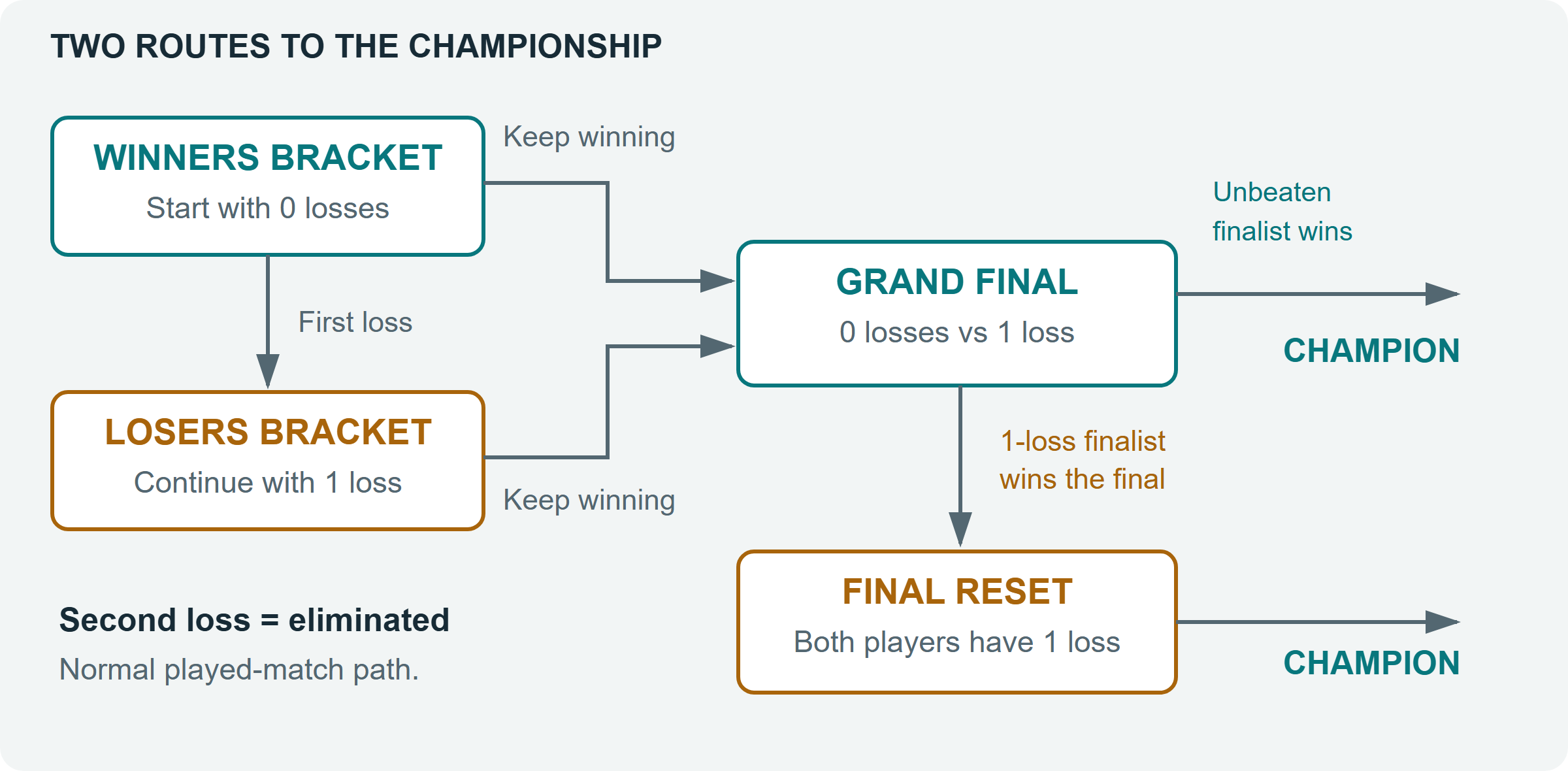
Why the Grand Final can happen twice
The winners-bracket finalist arrives with no losses. The losers-bracket finalist arrives with one. If the unbeaten player wins the Grand Final, the opponent has two losses and the tournament ends. If the losers-bracket player wins, both now have one loss: a Grand Final Reset decides the champion.
A bye is an automatic advance
A division uses a 4-, 8- or 16-slot bracket. When there are fewer entrants than slots, some first-round places are byes. You advance without playing that match. “Awaiting earlier results” means your opponent is still being decided.
Read the bracket or the schedule
Current Month shows your selected division. Bracket groups matches by stage; Schedule lists them in time order. My Tournament filters the important information for your entry. Use Archive to view recent completed series.
Concede Match gives up one match. Leave Tournament Permanently ends your participation after review. A double forfeit for mutual absence can also remove both players; those are exceptions to the normal two-loss path.
Know what you can win
Each division pays its own top three. With the prize-display update, Total across all divisions is the combined series funding, Selected division pool is the chosen division's total, and Selected division awards lists its first-, second- and third-place amounts. Example pool for 12 entrants is illustrative and disappears once actual amounts lock.
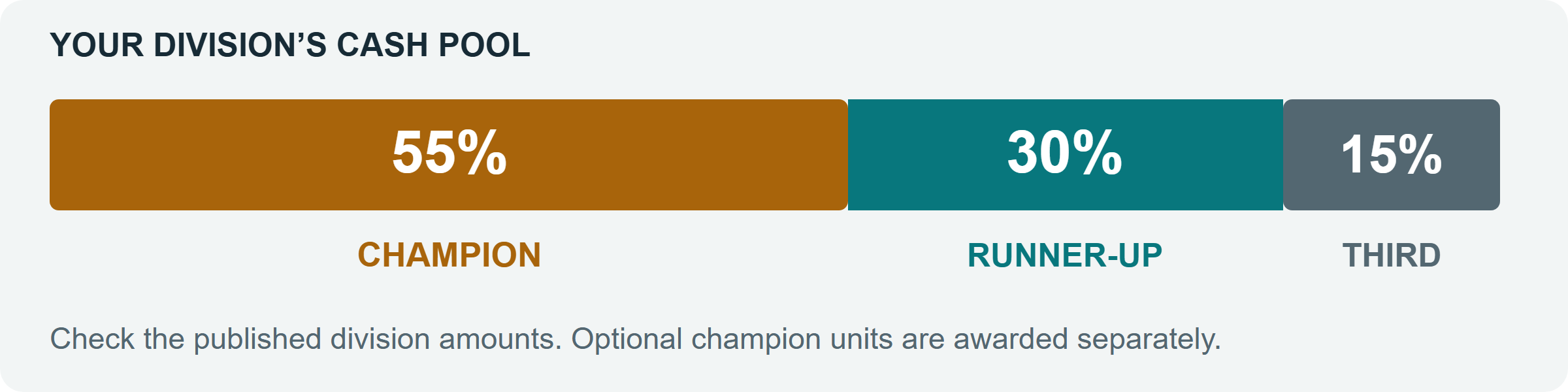
Where the cash pool comes from
The pool depends on the supplied lance's total BV, the number of entrants, the published prize rate and the division's scheduled rounds. Entry is free: the per-entrant funding figure is not a charge to your empire. The amounts lock when registration closes. Matches fought, kills, rematches and ordinary withdrawals do not increase or reduce them. A division that cannot establish eligible final placements follows separate cancellation rules. The displayed prize rounds include the possible final reset; drawn-match rematches do not add more funding.
Permanent champion prizes
If Champion units lists a mech or vehicle package, the champion of each division receives that advertised package as well as cash. “None configured” means there is no unit prize. Your temporary combat lance is separate and does not become permanent inventory.
When awards arrive
Prizes are delivered after the top three placements become final. Check Settlement on the prize card. Paid means delivery completed. Owed or Payout Pending means the award is awaiting delivery; a pending payout is not another entry fee or a request for payment.
Watch other matches
Select Spectate when it appears on a live match. Spectators can watch but cannot control combat units. You cannot spectate your own assigned match as a substitute for joining it as a fighter. Leave any spectator session before your own scheduled battle.
After the compatible client and battle-server update, choosing fighter entry closes ordinary spectator sessions belonging to the same account before opening the tournament connection. A different account or an active fighter session is never displaced. If another battle session is still active, leave it before joining; an ordinary session conflict does not count as an incorrect login.
Your tournament rating
Tournament ratings belong to your account and help group future divisions. Switching empires does not create a fresh rating. Tournament results are separate from the monthly Arena leaderboards and badges.
Keep this checklist handy
Read the status and buttons on your match card. They show what you can do at that point in the event.
I cannot find a tournament
If Current Month says no public series is available, registration has not been published for you. Check back when the next event is announced. If Arena Setup is blocked, use a larger screen.
My assigned time is outside my availability
The distance in the current warning is measured from a start that would fit the whole reserved match, including its grace period, rather than simply from the end of your submitted period. A fallback can fit neither player. The warning means a missed assignment will require review; it does not mean an absence has already happened or the match has been cancelled. If you cannot attend, report the match ID and your submitted times to an administrator. Unresolved review can still receive the automatic decision described below.
The match card shows a warning. With the window-close update, reporting an availability conflict does not prevent a checked-in opponent from receiving the no-show win when the arena closes. Accept Assigned Time if you can attend, then Check In or Join Battle. Check Out and Cannot Attend This Time clear check-in.
My opponent did not arrive
Join your battle, stay through the grace period, then use Request No-Show Review if offered. A service interruption or availability exception requires review. Do not assume an immediate win.
Request No-Show Review asks an administrator to examine the absence; it does not concede the match. A rejected request does not change the match. Reopen Tournaments to load the latest match card and check its status before submitting again.
Automatic decisions for unfinished matches
The automatic-resolution update lets ready matches proceed while an earlier result is under review. One unresolved match does not cancel the division. This update requires the compatible tournament release; use the status and review deadline shown in your event.
When an administrator has not resolved a drawn or broken battle, an automatic decision is posted one hour before the next opportunity: the conditional rematch for a primary battle, or the next round after a rematch. The player with the higher surviving BV wins. If BV is equal, the higher surviving unit count wins. The latest saved combat state supplies these figures.
For a battle that started, equal surviving figures or missing decisive combat state use the remaining conditional rematch when available, followed by the existing combat adjudication rules. With the window-close update, a waiting match is judged separately: exactly one checked-in contestant receives the automatic win at arena close. Both checked in with no combat winner does not count as mutual absence. Neither checked in can use the remaining rematch or a verified mutual no-show penalty; availability and service exceptions remain separate. Established no-show wins and concessions retain their winner.
The automatic decision has a 60-minute review period for administrator correction. If it is not replaced, it becomes final when that period ends, including when a dispute remains open. A late decision retains its full review period; ready matches continue and only matches awaiting that result wait. Published arena expiry times do not move.
I think the result is wrong
Use Dispute Result while it is available, before the displayed review deadline. Explain what happened clearly and include the match identifier shown on the card. A dispute holds advancement during review. With automatic resolution enabled, an unresolved dispute receives the fallback above; a dispute against the automatic decision does not extend its displayed deadline. Final results cannot be reopened through this process.
I need to stop playing
Concede Match gives up that match and follows normal bracket consequences. Leave Tournament Permanently blocks new matches, lets any current battle and result review finish, then has a separate 60-minute withdrawal review. It does not let you replace your locked empire.
Guide edition: 10 October 2026. This guide describes the current four-mech tournament format. Always follow the loadout, dates, prizes and status published for your particular event.
Before every match: check the local Assigned time • keep your registered empire active • leave other battles • check in • enter the arena • confirm your result afterward.
Tournaments in World History
Open Support ? World History and select Tournaments to see the first public tournament in each world and final standings for completed divisions. Final standings name first, second and third places. Individual round results stay in Tournaments. Provisional results and test or private tournaments are excluded. View Tournament opens the source series. See the World History guide for coverage and timeline filters.