Military
Tower design and placement
Create a blueprint, fabricate towers and place them on legal map hexes.
Reviewed
Terrain profiles are present in live world data; original legacy maps continue using their original generator, while converted zones retain their recorded profiles. The targeted correction for the empty Forest at 827,876 is prepared and awaits a future game update. Other placement updates require the compatible game update. Existing territory and protected assets retain their terrain.
Design a tower
Open Forces → Towers → Create. Enter the design name, construction factor and levels. Choose the firing profile, power plant and turret armour. Engine rating and heat sinks update from the power plant and weapon heat.
Add weapon rows, counts, one of the three fixed arcs and ammunition for systems that need it. Use the live summary and validation panel to resolve capacity or rule errors before selecting Create Design.
Fabricate inventory towers
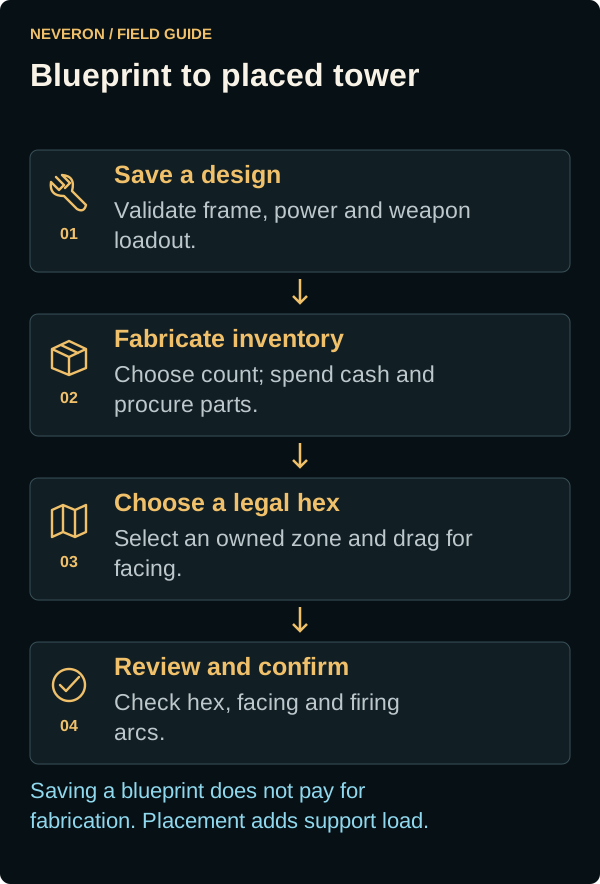
Saving a blueprint does not spend fabrication cash. Choose the saved design, set a count and review the create cost to produce inventory towers. This is the cash-spending and component-procurement step. Each design and inventory item shows the Support Points it will consume when placed.
Place a tower
- Select Place on an available inventory tower.
- Leave the map's Type selector on Tower and choose an owned zone.
- Choose a legal hex, drag towards the desired facing and release.
- Inspect the preview's hex, facing and firing arcs, then confirm.
The map shows existing occupancy and legal positions. Drag the Placement Map title bar if its controls obscure the chosen hex. The same map can place other unit types, but their eligibility differs.
Read the zone terrain
The updated Placement Map summary names the terrain profile. New land and unused, unclaimed zones included in the world update can use Plains, Forest, River or Mountain. Existing empire territory and saved placements keep their previous terrain. Looking at, claiming or placing in a zone cannot reroll its terrain. Connected world rivers have shallow crossings, arena rivers retain their dry crossings, and mountains have open routes; use the legal-position markers when placing.
Original legacy maps continue using their original terrain generator. Some unclaimed zones were converted to terrain profiles but missed a later map correction because they sit within a protected terrain buffer. These converted maps can still show repeating woods and straight cleared bands. The correction for the reported empty Forest at 827,876 is prepared for a future game update; it has not been applied yet. Other preserved maps keep their recorded terrain.
If a terrain preview is rejected as changed, reopen the placement map and review the position again. This profile integration awaits the compatible game update.
Cancel unfinished tower work
Open Empire Planning → Construction in progress to review cancellation of an unfinished tower order. Cancellation retires the inventory tower and returns only the unfinished share of verified cash paid. It does not return an intact tower or components. Delegates need the relevant building and military access.