Military
Repair Bays
Choose a bay, staff service positions and understand parts and repair attempts.
Reviewed
Owned-bay facilities, technicians, repair plans and history are implemented with world-specific availability. Live strategic damage integration, recovery transport and faction guest logistics remain unfinished. The original illustrated guide below describes that eventual full journey; those sections are future guidance.
Use the current owned-bay controls
Research and construct a facility through Buildings, then open Forces → Repair Bays. Facility tiers provide 2, 4, 6 or 8 service positions. Set assistants from 0 to 4 for each idle position and use the facility's single Save staffing button. Repairs need a technician and at least one assistant; four assistants give full speed.
Use Repairs to inspect the quoted plan and labour budget. Parts come from empire-wide inventory. Recruit and train technicians in their section, and review attempts in History. Upgrade individual bays on their facility cards. The empire owner can remove empty bays through Buildings: select the bay rows, choose Destroy Buildings, review the individual bay numbers and rebate, then confirm. The Retire empty bay action remains available on facility cards.
Before destroying a bay, move or dismiss every technician, including available technicians who are not working on a repair, wait for incoming transfers to finish, and finish or cancel open repair orders. The bay must be operational. You can select ordinary buildings and bays together; if any selected bay is busy or has changed, the entire selection stays in place. Refresh the zone and resolve the reported block before trying again. While confirmation is pending, another destruction is disabled; reopening Buildings checks the same request.
If bay selection is unavailable in your release, open Repair Bays, choose Facilities, then use Retire empty bay.
Share with faction saves a preference only: guest repairs and transport await the remaining Land War integration. The illustrated full-service guide below includes these future workflows.
The illustrated repair journey
A player's guide to restoring BattleMechs after Land War
Original guide: 17 September 2026. The complete repair journey below includes planned Land War, recovery transport and faction-service integrations. These parts are not yet fully available; do not rely on them to move or recover a unit. Use the in-game quote for current prices, staffing, time and eligibility.
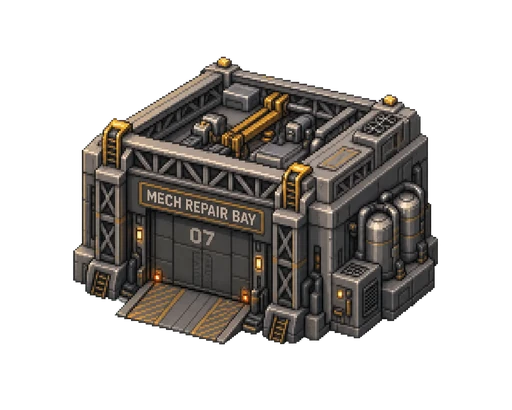
Existing Neveron Repair Bay building artwork.
What Repair Bays do
Repair Bays restore damaged strategic BattleMechs using skilled technicians, compatible parts, cash and time. Your facility determines which repairs are possible. Your technician determines how likely each attempt is to succeed. Assistants and local Military Support conditions determine how quickly the work progresses.
Land War damage persists after battle. Armour, internal structure, weapons, critical systems and ammunition are handled separately, so returning a unit to service can require several tasks.
Only destruction of the centre torso makes a chassis permanently irrecoverable. A BattleMech disabled by engine or head destruction can be rebuilt if its centre torso survives. Destroyed hardware needs new replacement parts, and repairing the chassis cannot bring back a dead pilot.
Repairs restore the unit's existing design. They do not change its loadout or automatically recover salvage. This guide covers strategic BattleMechs; vehicle repairs, infantry reinforcement and building repairs have separate rules. Arena and training battles retain their own damage/reset rules.
Choose the right bay
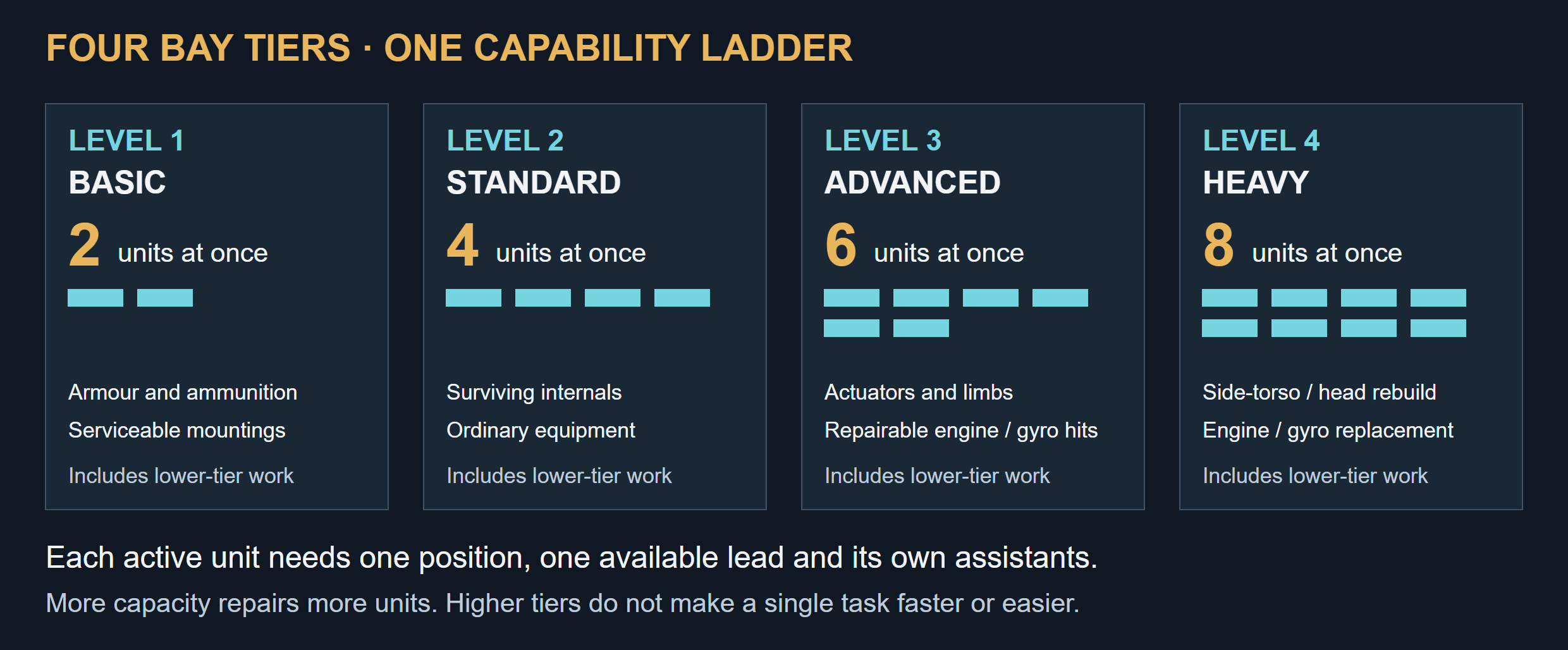
Four cumulative tiers provide 2, 4, 6 and 8 service positions. Each active unit needs a separate lead technician and assistants.
Each tier includes the capabilities of the tiers below it.
| Level | Facility | Units repaired at once | Added capabilities |
|---|---|---|---|
| 1 | Basic Repair Bay | 2 | Armour servicing, ammunition reloads and bin replacement in serviceable locations |
| 2 | Standard Repair Bay | 4 | Surviving internal structure; ordinary weapons, heat sinks, CASE, sensors, life support and supported equipment |
| 3 | Advanced Repair Bay | 6 | Actuators, repairable engine/gyro critical hits, destroyed arms and legs, and catalogue-designated major disassembly |
| 4 | Heavy Reconstruction Bay | 8 | Destroyed side torsos, major head/cockpit work, complete engine and gyro replacement |
Every active unit needs its own service position and available lead technician. A Standard bay with four positions but only one available technician repairs one unit at a time. A single unit has one active task at a time; extra positions let you repair other units concurrently.
A higher tier does not give a hidden speed or success bonus. An Elite technician cannot perform Level 4 work at a Level 2 bay.
Destroyed sections must be rebuilt before their missing equipment can be installed. Reconstructing an arm restores its structural shell and mountings; weapons, actuators, armour and other components remain separate tasks with separate costs. A destroyed engine or gyro needs replacement rather than a sequence of cheaper critical-hit repairs.
Get your first repair running
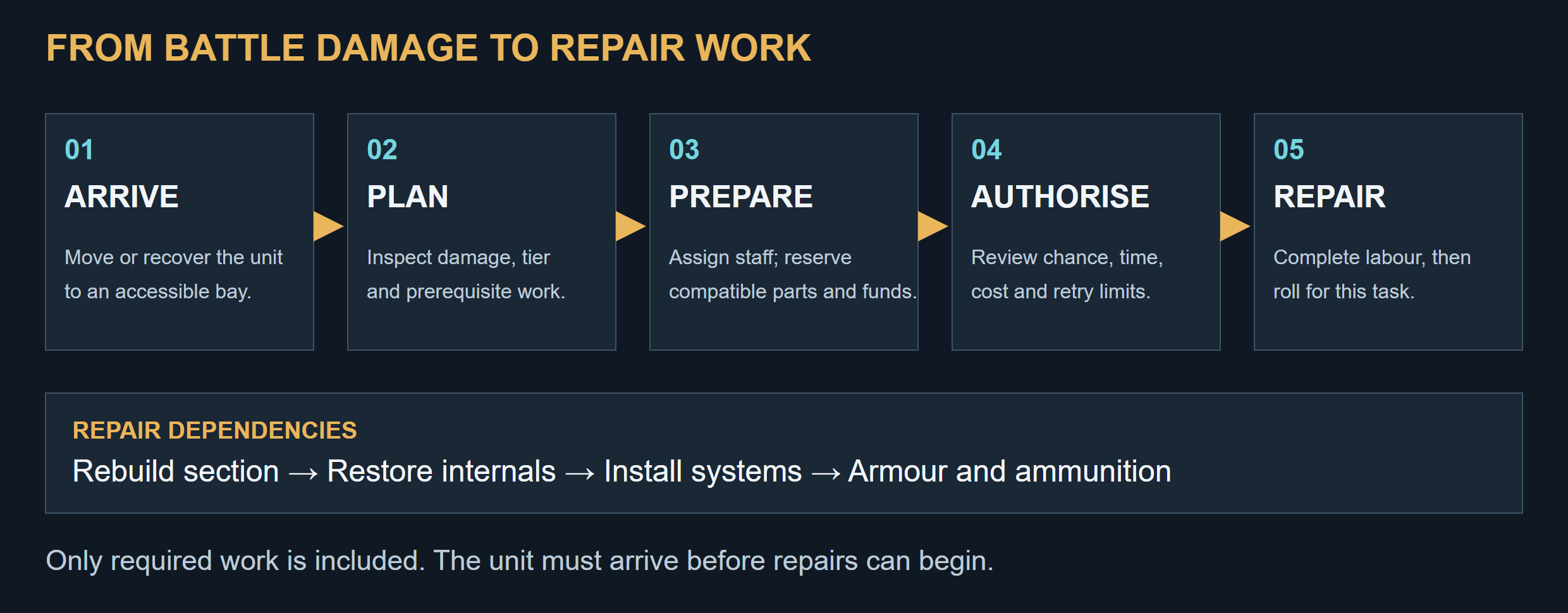
The repair journey, from legal arrival through an approved plan to individual repair attempts.
- Find a suitable facility. Use an operational owned bay or an accessible faction-shared bay with the required tier. To build your own, complete the appropriate Repair Bay research and construct the facility through Buildings. Research alone does not create a building or staff it.
- Bring the unit to the bay's zone. Mobile units use legal strategic movement. Immobile survivors require paid recovery transport. Recovery has its own cost, travel time and strategic risks; creating a repair order does not move the unit.
- Prepare the staff. At your own bay, recruit or assign an available lead technician and allocate assistants to the service position. The initial staffing schedule allows up to four assistants per position: four provide full staffing, fewer slow the work, and zero prevents work.
- Inspect the damage and choose a plan. Check what can be repaired here, what needs a higher tier and which prerequisite tasks are included.
- Supply compatible parts and approve the quote. Review the technician, success chance, parts, one-attempt time, operating costs and retry limits. Source missing items through Manufacturing or Market.
- Start the order and review its progress. Work continues while you are offline when staffing, funding and facility conditions permit. Check History for completed attempts, dice results, charges and repairs.
The unit must be free of conflicting battle, movement, sale, transfer, training or repair commitments. While its repair order holds it, it cannot also be deployed or moved.
Select the work you need
| Plan | Use it for |
|---|---|
| Repair All Available Here | All eligible work at the current bay, including tasks that still need parts |
| Armour Only | Restoring armour, with any required prerequisites shown in the quote |
| Reload Only | Refilling ammunition bins, with required bin or mounting work where applicable |
| Restore Mobility | Repairing the systems and sections needed for movement |
| Weapons/Equipment | Restoring supported weapons and equipment |
| Individual tasks | Choosing a specific repair or limiting spending to selected work |
Plans respect dependencies. Typical work proceeds from section reconstruction to internal structure, systems and components, then armour and ammunition. Independent undamaged locations can receive service even when another branch needs a higher bay.
“Repair All Available Here” does not promise a fully restored unit: a Basic bay cannot rebuild a missing leg. Read the unresolved-damage list and deployment eligibility before returning a partially repaired BattleMech to service.
Understand technician skill and repair rolls
Each completed attempt rolls two six-sided dice. It succeeds when their total meets or exceeds the task's target number (TN).
TN = technician base + repair modifier + any explicitly quoted situational modifiers.
| Technician grade | Base TN |
|---|---|
| Green | 7 |
| Regular | 6 |
| Veteran | 5 |
| Elite | 4 |
Lower is better. The initial rules have no additional situational modifier. Compatibility and facility tier determine eligibility; staffing affects time rather than the roll.
| Task | Minimum bay | Regular technician | Elite technician |
|---|---|---|---|
| Armour, ammunition reload or bin replacement | 1 | TN 4 — 91.7% | TN 2 — 100% |
| Surviving internal structure | 2 | TN 5 — 83.3% | TN 3 — 97.2% |
| Ordinary weapon or equipment | 2 | TN 6 — 72.2% | TN 4 — 91.7% |
| Actuator or non-terminal engine critical | 3 | TN 7 — 58.3% | TN 5 — 83.3% |
| Non-terminal gyro critical or limb reconstruction | 3 | TN 8 — 41.7% | TN 6 — 72.2% |
| Engine, gyro or side-torso replacement | 4 | TN 9 — 27.8% | TN 7 — 58.3% |
| Cockpit replacement or major head reconstruction | 4 | TN 10 — 16.7% | TN 8 — 41.7% |
A natural 2 is not an automatic failure, and a natural 12 has no special override. No destructive complication applies under these rules.
Skilled technicians are especially valuable for reconstruction. A Regular technician attempting TN 10 succeeds on one in six attempts on average; an Elite technician at TN 8 succeeds on 15 of 36 outcomes. Neither result guarantees a completion date.
Costs, failures and retries
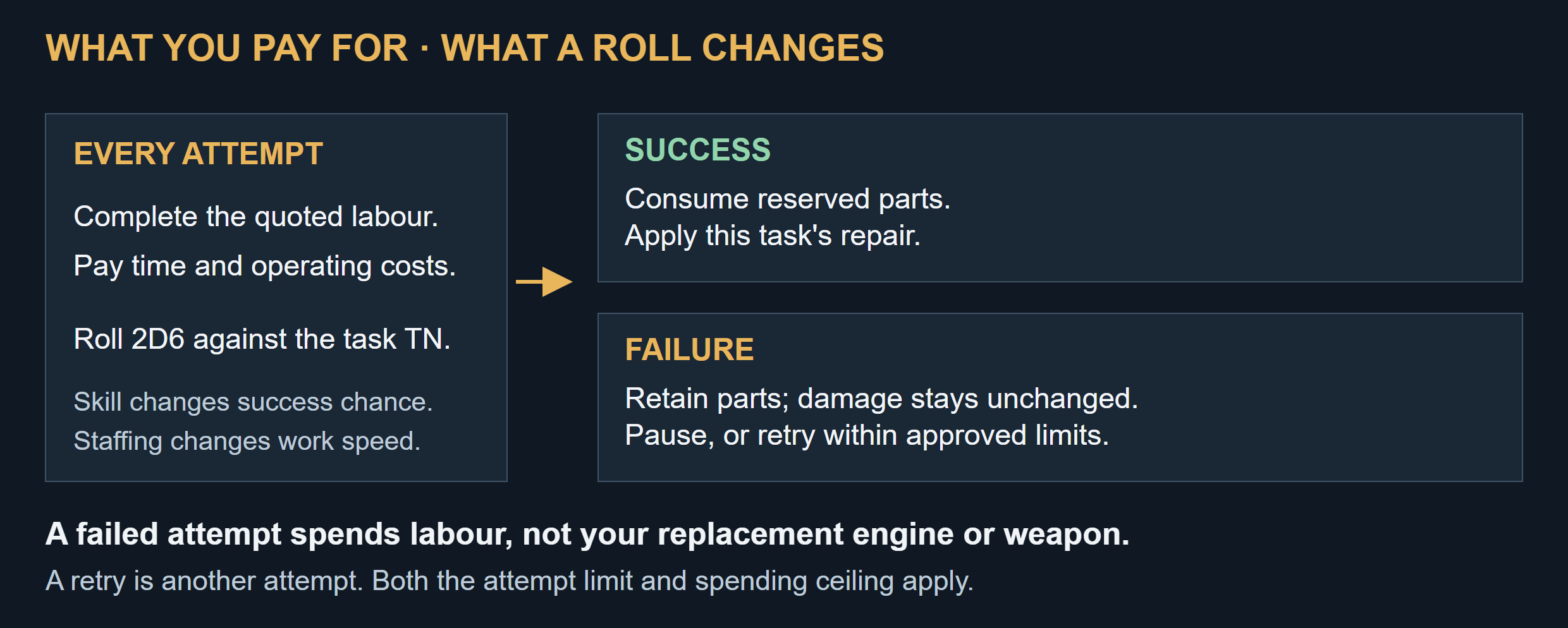
Labour and operating time are paid on every attempt. Failed attempts retain parts and do not worsen damage.
Repair costs combine parts and materials with labour and operating time. Recovery transport, facility construction and technician training are separate expenses. Existing unit support costs still apply.
Before an attempt, the required stock and operating funds are reserved. Reserved parts cannot be sold or used elsewhere. Parts come from the unit owner's empire-wide inventory, including when using a faction bay; no local parts depot or cargo delivery is required for those materials.
Success consumes the reserved parts and applies that task's repair. Failure consumes the attempt's labour time and operating cost but retains its parts and leaves the existing damage unchanged. It does not destroy an expensive replacement weapon or engine.
The default is one attempt, then pause for review after failure. You can approve automatic retries with both an attempt limit and spending ceiling. Retries stop when either limit is reached.
Compare the full plan and likely repeat-attempt costs with buying a replacement unit. Higher-tier capability makes recovery possible; it does not guarantee that rebuilding is economical.
Manufacturing research and installation capability are separate. You may buy a compatible finished part without knowing how to manufacture it, but the bay must still meet any explicit installation requirement. Wrong engine ratings, ammunition types or technology variants cannot substitute for the specified item. Missing parts pause the work; the repair order does not purchase them automatically.
Build a skilled technician team
Recruit Green technicians from available empire workers. Recruitment has a fee and delay, and reserves the worker so they cannot also work elsewhere. Retained technicians continue to draw wages while idle.
| Promotion | Minimum training facility | Research and other requirements |
|---|---|---|
| Green to Regular | Level 1 | Technician Training 1, course fee, time and a free training seat |
| Regular to Veteran | Level 2 | Technician Training 2, required practical XP, fee, time and seat |
| Veteran to Elite | Level 3 | Technician Training 3, required practical XP, fee, time and seat |
Training removes that technician from repair duty. Other staffed positions continue working, and training seats are separate from service positions. The facility roster is capped by its position count; recruits, trainees and incoming transfers count toward that limit.
Practical XP comes from successful restoration work. Failed attempts, undamaged-part swaps and arena resets do not award repair XP. Promotion occurs when the course requirements are completed, without another random roll.
Technicians can work below their training grade: an Elite technician remains useful at a Basic bay. Transfers between zones take time and make the technician unavailable in transit. Recruitment and training use your own facilities; faction sharing provides unit repair service, not access to another empire's training seats.
Pausing a course preserves progress. Cancelling loses its progress and non-refundable course fee but preserves earned practical XP. Dismissing an idle technician returns the worker allocation; a later recruit starts again as Green.
Use or offer faction repair services
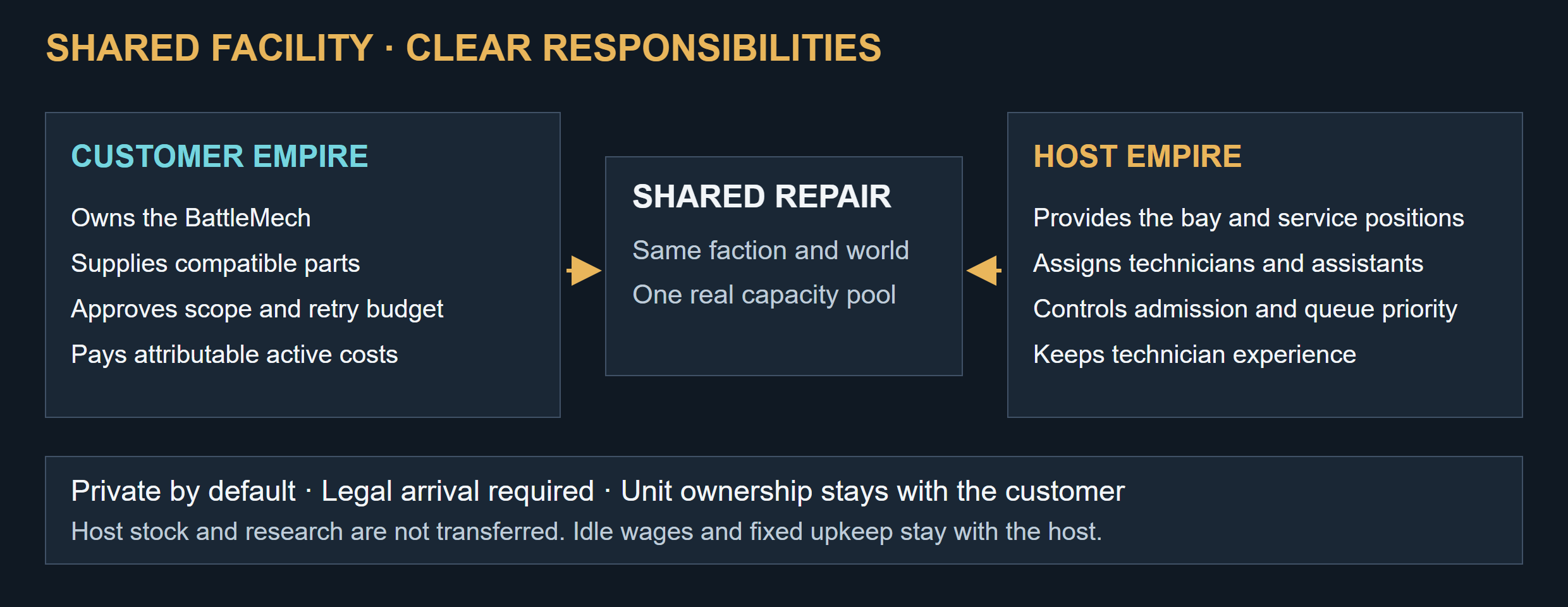
Faction service shares the facility and staff while preserving customer ownership and spending control.
New bays are private. An authorised owner can select Share With Faction to admit accepted members of the same faction in the same world. Pending applicants, unrelated empires and allies outside the faction do not qualify.
You do not need to research or own the host's bay tier to use its service. The host supplies the facility, technicians, assistants and required installation capability. You retain your unit, supply compatible parts and approve the work and budget.
| Responsibility | Host empire | Customer empire |
|---|---|---|
| Facility and staffing | Provides and controls them | Uses available service capacity |
| Unit and repair scope | Performs the approved work | Owns the unit; chooses tasks, retries and cancellation |
| Parts and materials | Does not implicitly supply stock | Supplies its own inventory |
| Fixed upkeep and idle wages | Pays them | Does not reimburse the whole facility |
| Active labour and variable operation | Receives the attributable reimbursement | Pays the quoted cost, including failed attempts |
| Technician experience | Its technician earns the XP | Receives the completed repair |
The initial service has no profit markup or automatic sale of host parts. Shared and owned jobs use the same positions. The host controls admission, staffing and queue priority, but cannot add chargeable work or expand your retry budget.
Faction access does not grant unrestricted passage through other zones. Arrange legal movement or recovery, and check access again when the unit arrives.
If the host makes the bay private or common faction membership ends, no new guest attempt starts. An already active, funded attempt may finish while the location remains safe; it receives no automatic retry. Unstarted work is cancelled and unused reservations return to their original owners. A paused attempt does not qualify for this exception. Arrange lawful departure or paid recovery for the unit.
Pauses, cancellation and wartime interruptions
Orders can wait for parts, staff, funds, prerequisites or a usable facility. A blocked or paused order does not occupy an active service position, so another ready unit can use it.
A manual pause preserves partial labour and keeps the unit and parts reserved. Resuming that attempt uses its original technician. Changing the lead starts a fresh attempt and discards partial labour without refunding work already paid for.
Cancelling releases unused reservations and the repair commitment. Completed tasks stay repaired; unfinished tasks provide no partial restoration. A unit can leave only if its movement or recovery requirements are satisfied.
An attack, unsafe zone, facility damage, capture or upgrade can interrupt work. Completed repairs persist. Capture pauses work and preserves repair ownership records pending Land War settlement; a repair lock gives no immunity from strategic capture or destruction. Unused stock and funds remain attributable to their original owners and follow any applicable Land War settlement rules.
Three practical examples
Routine turnaround. A BattleMech returns with armour damage and spent ammunition. A staffed Basic bay can handle both. A Green technician's routine TN 5 gives 83.3% success per task; a Regular technician's TN 4 gives 91.7%. Armour and each ammunition bin are separate work items.
A destroyed PPC. The weapon's location and mountings survive. A Standard bay can fit a compatible replacement PPC after any required structure work. If the attempt fails, labour is spent but the replacement PPC is retained. If the arm itself is gone, reconstruct it at Level 3 first.
A crippled survivor at a faction bay. Your BattleMech loses its head and engine but retains its centre torso. Arrange paid recovery to an accessible Heavy Reconstruction Bay. The plan can include head structure, cockpit, engine, sensors, life support and armour as separate required tasks. You supply the parts and approve labour funding; the host supplies staff. The chassis can return to service, but a killed pilot remains lost.
Before approving an order
- Is the chassis recoverable, and is the unit physically present at an accessible bay?
- Does the bay support every selected task and its prerequisites?
- Is a lead technician available, with adequate assistants and local support?
- Are the parts compatible, and are the quoted operating funds available?
- Have you checked success chance, one-attempt time and retry limits?
- Do you understand which damage will remain and whether the unit can deploy afterward?
- For faction service, is arrival legal and is a departure or recovery route available?