Economy
Market and trading
Find listings, review purchase totals and trade with your faction.
Reviewed
This guide follows the current client. Available actions depend on your empire, permissions and the release running in your world.
Find an item
Open Economy → Market. Choose public listings or your faction market when available. Select the category for conventional arms, mechs, weapons and ammunition, equipment or resources. Search filters item names in the current category; use pagination for further results.
Review a purchase
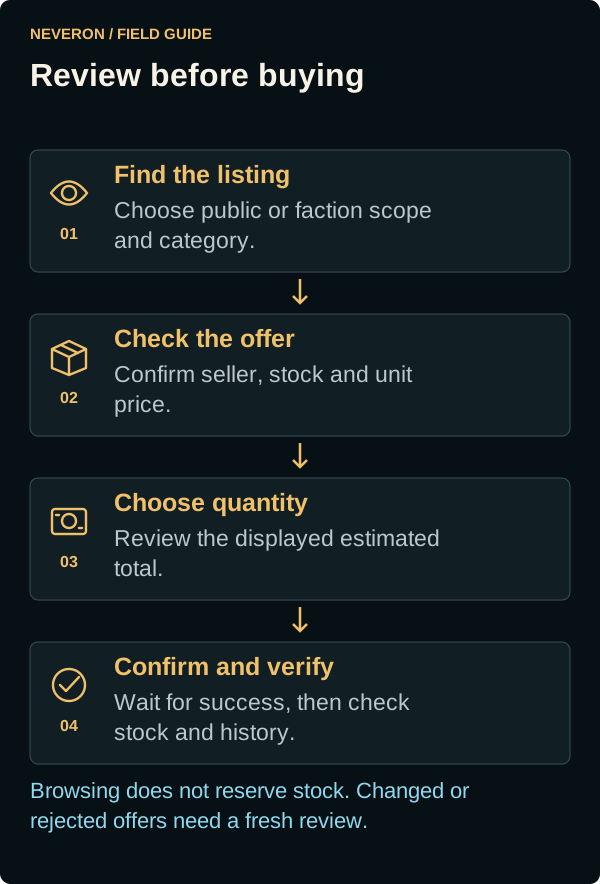
- Compare the item, seller, unit price and available quantity.
- Open the purchase action and enter the quantity.
- Check the displayed unit price and estimated total before confirming.
- Wait for the result and review stock and Finance history.
Quantities, funds and listing availability are checked when purchasing. If stock or price changes, read the error, refresh and review again. A displayed listing does not reserve its quantity for you.
Sell and remove listings
Use the relevant inventory selling controls to list eligible stock. Your own listings offer removal controls when allowed. Check the selected scope so stock goes to the intended audience. Faction membership and permissions govern access to faction stock.
Understand value and limits
Resource and manufacturing reference values are planning aids, not purchase offers or guaranteed resale prices. Finance shows applicable market limits and recent sales. Compare fees, quantity and the actual cash movement before judging a trade's profit.