Empire basics
Getting started
Find your way around Neveron and plan your first steps.
Reviewed
Empire transfer account lookup correction awaits strategic-server rollout; the guide includes an interim capitalization workaround. Empire/emperor identity maintenance requires compatible client/strategic publication and ordered migration 95; prepared locally. Startup loading/retry recovery and the restored once-per-empire login notice behavior await compatible client/server publication. Other actions depend on your empire, permissions and the release running in your world.
Enter your empire
Open Neveron, sign in and choose the empire you want to manage. Check the empire shown in the header before spending money, assigning workers or moving units. Delegated access can expose fewer controls than ownership.
On smaller screens, open the navigation drawer to reach the same grouped pages. The wiki works on phones; arena setup and combat require a larger screen.
When an empire takes time to load
With the startup recovery update, Loading empire... means Neveron is waiting for your empire details and will retry briefly. If it cannot finish, select Retry to try again or open Empire Management to select another empire. Complete any sign-in verification or required terms before continuing. A connection loss uses the separate reconnect indicator.
Rename your empire or emperor
Open Empire Management, choose an empire you own, enter the new empire or emperor name and select its Rename button. Empire rename costs 20 Donation Points; emperor rename costs 10. Review the confirmation before submitting.
With the identity maintenance update, tournament registrations and related records follow an empire rename, and emperor rename applies to the empire you selected. A rejected change leaves your name and Donation Points intact. Leave active arenas and wait for bets or wars to resolve before renaming an empire. The correction requires the compatible client and server update.
Transfer an empire to another account
Open Donate, find Transfer Empire, choose an empire you own under Source Empire and enter the recipient's login account name under Target Account. Select Transfer Empire and review the recipient and exact Donation Point cost before confirming. The base cost is 20 Donation Points multiplied by the source empire's level.
The recipient must be a different existing account with fewer than five empires. Resolve active wars and other outstanding activity before transferring. Giving away your active empire can end your current session.
If you see Target account does not exist despite a correct recipient name, sign out and sign back in using the exact capitalization of your own account name, then enter the recipient's exact account name. The account lookup correction removes this capitalization problem after the server update is deployed. A rejected transfer leaves ownership and Donation Points intact.
Game updates
Read any update notice shown after signing in, then close it when finished. Notices are delivered once for each empire. If another message replaces an update, use the Game Updates archive to read it again.
To revisit release notes, open Empire Management and select Game Updates.
A practical first circuit
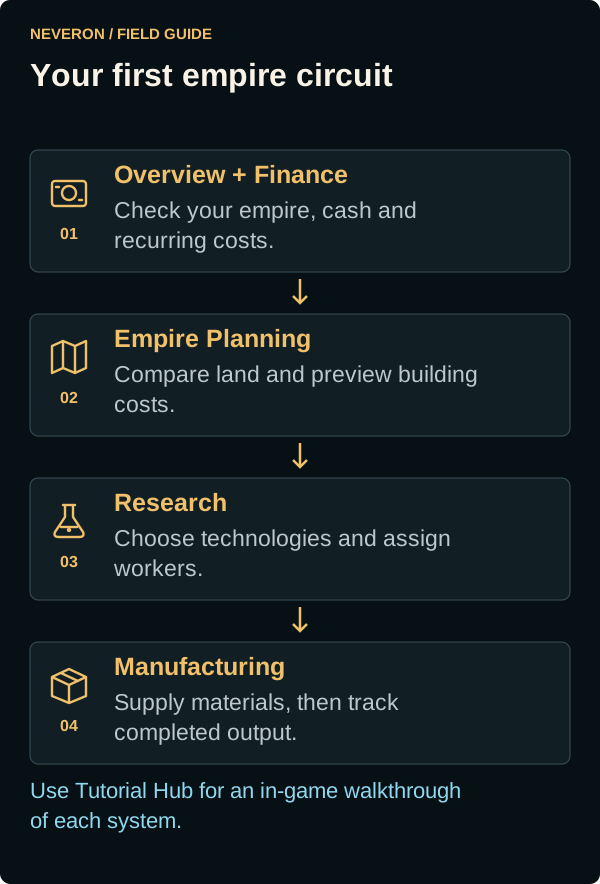
- Open Overview for your empire summary, then Finance to compare cash, income and recurring expenses.
- Open Empire → Empire Planning to compare owned zones and their yields, occupied space and queued buildings. Preview construction before spending.
- Use Buildings for construction and workforce controls. Administration capacity and Military Support affect your running costs.
- Open Economy → Research to choose technologies and assign workers. Check prerequisites and capacity before creating a queue.
- Use Manufacturing to turn research, workers and resources into products. Buy missing stock through Market when suitable listings exist.
- Visit Arenas when you are ready to learn tactical combat, and read the rules of the selected match before entering.
Learn in the game
Open Support → Wiki for player guides or Support → Features for implementation status and remaining work. Both open in a new tab so you can keep your empire open.
Open Support → Tutorial Hub for available walkthroughs, saved progress and replay. Some tutorials need a suitable game state: Repair Bays requires a completed facility, and battle tutorials need a supported screen size. The wiki provides reading material alongside those interactive tours.
When a control is missing
Check the selected empire, delegated permissions, research requirements and the page's availability message. A documented feature may depend on a later release or be disabled in your world. Read the feature's Availability note and the public Feature status page before planning around unfinished systems.